
Processes
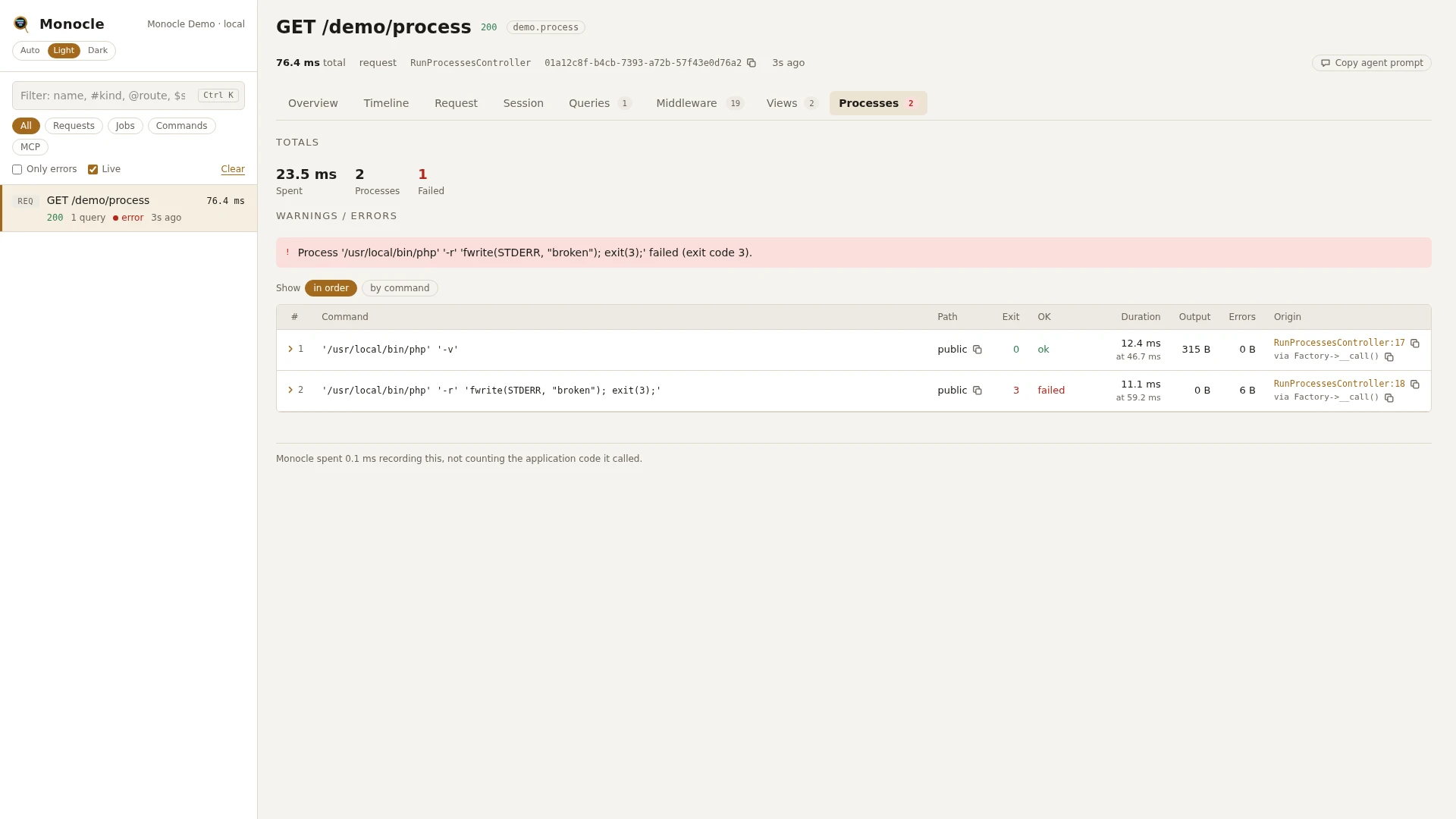
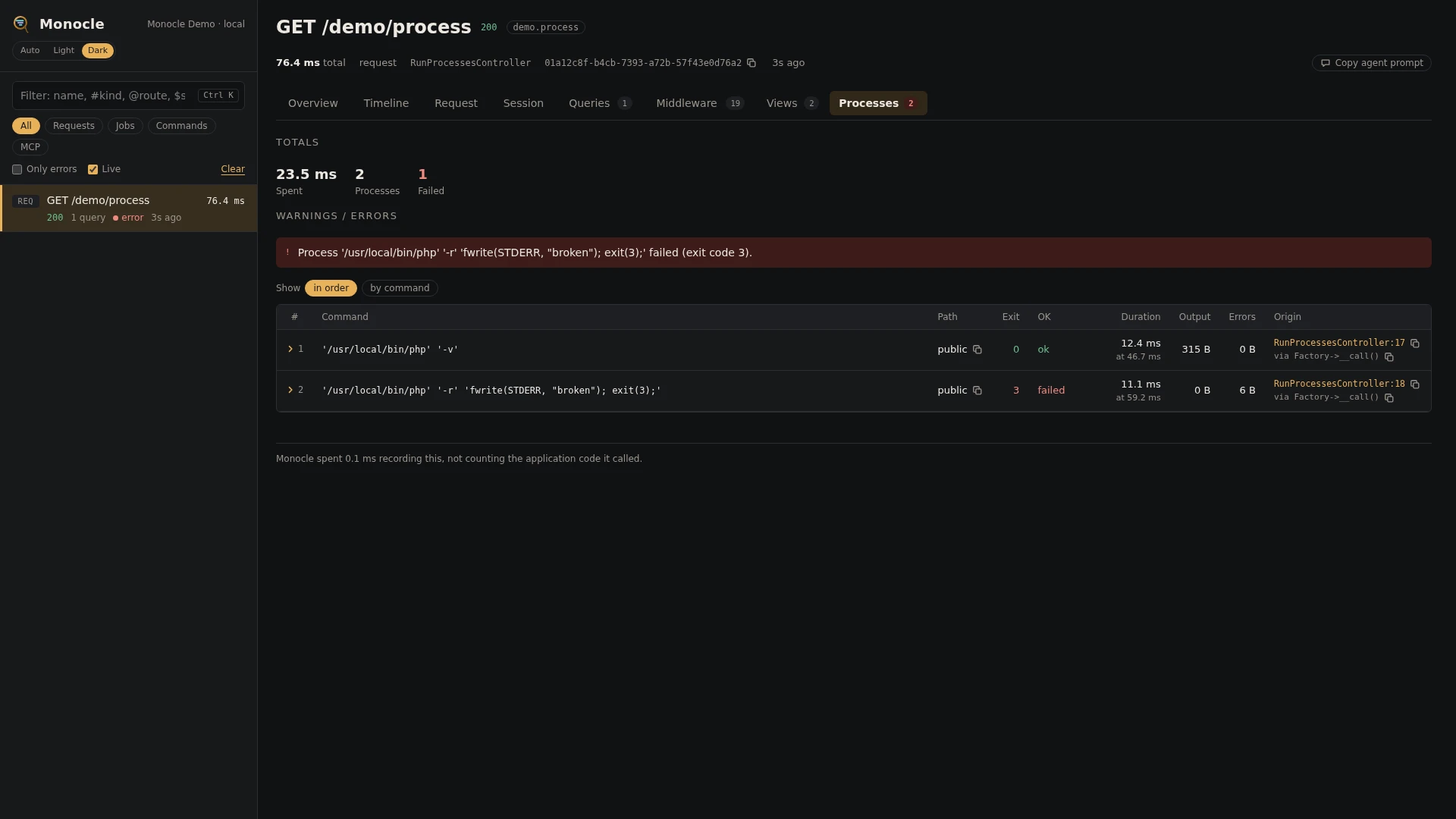
The Processes lens records every external command your code starts with Laravel's Process facade during a capture: Process::run(), Process::start(), pools and pipes. Each one is a row with its command line, exit code, duration and output sizes, and a process span on the timeline.
Rows
Section processes has one row per process, written when the process has finished.
| Field | Meaning | Unit | Missing when |
|---|---|---|---|
command | The full command line as it was run, such as 'git' 'rev-parse' 'HEAD' | - | never |
path | The working directory, relative to your project (. for the project root); absolute when outside it | - | null when it could not be determined |
exit_code | The exit code | - | null when the process could not start, or was still running when the capture ended; may be null after a timeout |
successful | true when the exit code was 0, false when it was not, the process timed out or could not start | - | null when the outcome is unknown (a background process nobody waited for) |
timed_out | true when the process ran past its timeout | - | never |
duration | From the start of the process until its result was known | ms | never |
output_bytes | Size of what the process wrote to standard output | bytes | null when the process ran with quietly(), or the outcome is unknown |
error_output_bytes | Size of what it wrote to standard error | bytes | null in the same cases |
async | true for a process started in the background (start() or a pool) | - | never |
exception | class, message, file (relative path and line) and previous of the exception the process threw | - | null unless it timed out or could not start |
time | When the process started, counted from the start of the capture | ms | never |
origin | The file and line in your code that started it, with a short call chain | - | when origins are turned off |
How each way of running a process is recorded:
Process::run()is one row, from start to finish.Process::start()is one row withasync: true. It runs from the moment it started until its result was known: when you calledwait(), or whenrunning()first reported it had stopped. A background process nobody waited for is closed when the capture ends, with an unknown outcome.Process::pool()gives oneasyncrow per process in the pool.Process::pipe()gives one row per step of the pipe.- With
Process::fake(), faked processes are recorded too, with the exit code and output of the fake.
Linking commands to the capture that started them
With trace.processes on (the default), every process started through the facade while a capture is recorded gets two environment variables: MONOCLE_TRACE_ID (the trace) and MONOCLE_PARENT_ID (the capture that started it). When the process runs an artisan command of an application with Monocle enabled, such as Process::run('php artisan orders:sync'), that command's capture becomes a child of the capture that started it and shows up in its trace. Variables you set with Process::env() win over these. See Tracing.
Totals, warnings and errors
When the capture has rows in processes:
| Total | Label | Unit | Meaning |
|---|---|---|---|
processes_ms | spent | ms | Duration of all processes, summed (background processes overlap, so this can exceed the capture's duration) |
processes | processes | count | Processes recorded |
processes_failed | failed | count | Processes that timed out, exited with a non-zero code or could not start |
Errors, at most three messages per capture (processes_failed counts them all):
Process <command> timed out.for a process that ran past its timeout.Process <command> failed (<reason>).for a process withsuccessful: false. The reason is the exception message when there is one (the process could not start), otherwiseexit code <code>.
Warning, at most three messages per capture: Process <command> took <n> ms. for every process whose duration is at least slow_ms. Slow processes are flagged wherever they were started, also from inside a package.
A background process nobody waited for is neither an error nor a failure.
In the dashboard
The Processes tab lists the processes, with columns for the command, working directory, exit code, OK (ok in green or failed in red), timed out, async, duration, and output and error output sizes. Group the rows by command to see how often the same command ran and how long it took in total. Click a row to fold it out: every field in full, the exception if there was one, and the line of your code that started the process with its call chain.
On the Timeline, each process is a process span from when it started to when its result was known, named after the first 60 characters of its command line. Background processes show as spans running alongside the code that started them.
For agents
Every failed or timed-out process of the latest capture. monocle-rows with:
{"section": "processes", "where": [{"field": "successful", "op": "=", "value": "0"}], "fields": ["command", "path", "exit_code", "timed_out", "exception", "origin"]}The slowest processes first. monocle-rows with:
{"section": "processes", "sort": "duration", "dir": "desc", "limit": 5, "fields": ["command", "duration", "async", "origin"]}Recent captures that ran a given command, such as ffmpeg. monocle-list with:
{"has": ["processes"], "since": "1h"}then monocle-rows on each id with "section": "processes", "search": "ffmpeg". See For AI agents.
Configuration
Turn the lens on or off, or give it options, in the lenses block of config/monocle.php, keyed by the lens class: true runs it with its defaults, false turns it off, an array sets its options. See Lenses.
| Option | Default | Effect |
|---|---|---|
slow_ms | 1000 | A process taking at least this many milliseconds gives a warning. |
Other settings that affect this lens:
except: processes started during a request or command that is not recorded are not recorded either.origin: whether rows carry the line of your code that started the process.trace.processes: whether processes get the trace in their environment (defaulttrue).
Command lines are masked with mask.inputs: the value of a long option whose name matches, written as --password=secret or --token secret, and the value of a variable set in front of the command, such as DB_PASSWORD=secret php artisan migrate. Entries keyed by ProcessLens::class apply to this lens only.
use ExeQue\Monocle\Lenses\ProcessLens;

'lenses' => [
    ProcessLens::class => [
        'slow_ms' => 3000, // video conversions are expected to take a while
    ],
],
Requirements and limits
No extra packages are needed.
- Only processes started through the
Processfacade (or Laravel's process factory from the container) are recorded. Symfony'sProcessused directly,exec(),shell_exec(),system(),passthru(),proc_open()and backticks are not. - The output itself is not stored, only its size.
- Only named values are masked. A secret passed as a short option (
-p secret), as a plain argument, or throughProcess::env()is not recognised; variables passed withenv()are not recorded at all. - Only processes started while a capture is being recorded are kept.