
AI
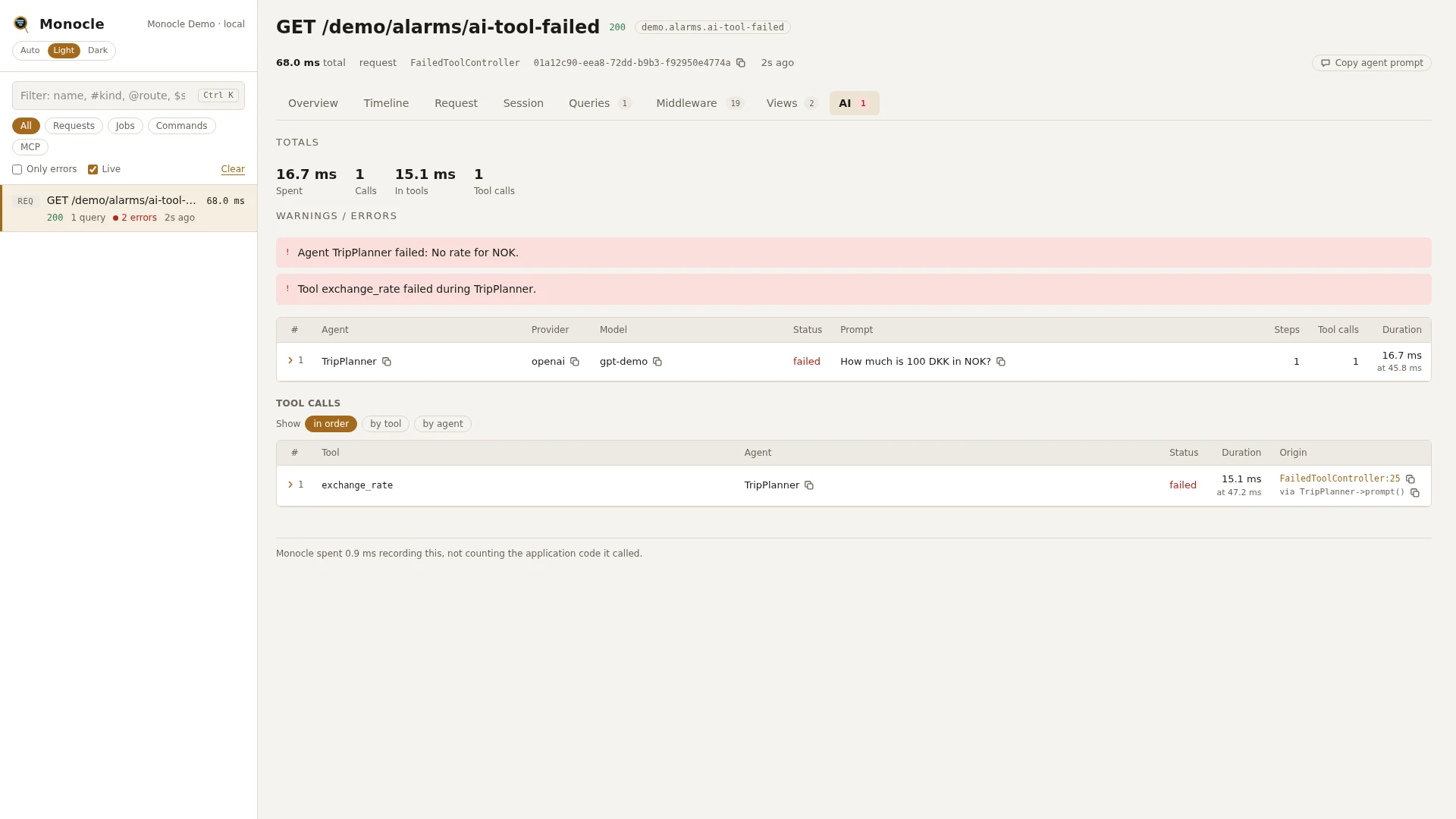
The AI lens records every laravel/ai agent run in a request, job, command or MCP call: the prompt, the response, each step, every tool call with its time, and the tokens used. An agent offered to another agent as a tool (a sub-agent) is recorded as a tool call of the calling agent and as an agent run of its own, linked to its caller.
Rows
Section ai: one row per agent run
A row is written when the run ends, whether it succeeded or failed. A sub-agent's run gets its own row.
| Field | Meaning | Unit | Missing when |
|---|---|---|---|
agent | The agent class. | - | never |
invocation_id | The id laravel/ai gave this run. | - | never |
parent_invocation_id | The invocation_id of the agent that started this run. | - | the run was not started from another agent |
provider | The provider name, taken from the response when it reports one. | - | the provider could not be determined |
model | The model, taken from the response when it reports one. | - | the model could not be determined |
status | ok or failed. | - | never |
prompt | The prompt text, shortened to max_text characters when set. | - | never |
response | The response text, shortened to max_text characters when set. Also filled for a streamed run. | - | the run failed |
structured | The structured output. | - | the agent returns no structured output, or the run failed |
streamed | true when the run was streamed. | - | never (false) |
steps | How many steps the run took. | count | never |
tool_calls | How many tools the agent called. | count | never |
failed_tools | The names of the tools that failed during the run. | - | empty when none failed |
tokens | input, output, cache_read, cache_write and reasoning tokens, added up over all steps. | tokens | never (zeros) |
exception | The exception, with its previous exceptions. | - | the run did not fail |
duration | How long the run took, including its steps and tool calls. | ms | never |
time | When the run started, counted from the start of the capture. | ms | never |
Rows in ai have no origin.
Section ai_tools: one row per tool call
| Field | Meaning | Unit | Missing when |
|---|---|---|---|
tool | The tool's name: what its name() method returns, or else its class name in snake case. For a sub-agent, the name of the tool the agent is offered as. | - | never |
class | The tool class. For a sub-agent, the class of the agent behind the tool. | - | never |
sub_agent | true when the tool is another agent. | - | never (false) |
agent | The class of the agent that called the tool. | - | the calling agent run is not known |
invocation_id | The invocation_id of the calling agent run. Match it against ai rows. | - | never |
tool_invocation_id | The id of this tool call. | - | never |
status | ok or failed. | - | never |
arguments | The arguments the model passed to the tool, masked like request input. | - | never |
result | What the tool returned, as text: strings as they are, other values as JSON. A result with keys (an array, an object or JSON text) is masked like request input. Shortened to max_text characters when set. | - | the tool failed |
exception | The exception the tool threw. | - | the tool succeeded |
duration | How long the tool took. For a sub-agent, this includes the sub-agent's whole run. | ms | never |
time | When the call started, counted from the start of the capture. | ms | never |
origin | The line in your code that led to the call. | - | no application code was on the way |
In the timeline
Each run is an ai.agent span named after the agent class (without its namespace). Under it, each step is an ai.step span (step 1, step 2, ...) with the provider, model, number of messages, whether it is the final step, the tool calls it asked for, the finish reason, its tokens, the provider's time (provider_ms) and its status. Each tool call is an ai.tool span under the step that asked for it, with its arguments, result, status and the tool's own time (tool_ms).
A sub-agent's ai.agent span sits under the ai.tool span that started it, so the timeline shows the whole chain: agent, step, tool, sub-agent, its steps and its tools. An agent started from inside another agent, but not through a tool, sits under that agent.
Totals, warnings and errors
The summary gets these totals when the capture has at least one ai row:
| Total | Label | Value |
|---|---|---|
ai_ms | spent | The duration of the top-level ai rows added up, in ms: rows whose parent_invocation_id is not another row. A sub-agent runs inside its caller's time, so it is not added again. |
ai_tokens | - | input, output, cache_read, cache_write and reasoning tokens over all rows. |
ai_input_tokens | input | The input tokens over all rows, in tokens. Hidden on the overview while 0. |
ai_output_tokens | output | The output tokens over all rows, in tokens. Hidden on the overview while 0. |
ai_cached_tokens | cached | The cache_read tokens over all rows, in tokens. Hidden on the overview while 0. |
ai_by_model | - | The number of runs per provider/model. |
ai_tokens_by_model | - | Per provider/model: input (the input tokens not read from cache), cached (cache_read) and output tokens. The dashboard prices these for the estimated cost. |
ai_calls | calls | The number of ai rows, sub-agents included. |
ai_tool_ms | in tools | The duration of the tool calls made by top-level runs added up, in ms. A sub-agent's tool calls run inside the tool call that started it, so they are not added again. Only when there were tool calls. |
ai_tool_calls | tool calls | The number of ai_tools rows, sub-agents' tool calls included. Only when there were tool calls. |
The overview also lists the time agents took among what the time was spent on. There, only agents that were not started from another agent count, so nested time is not counted twice.
This lens reports no warnings. It reports these errors, at most five per capture:
Agent {class} failed: {message}- an agent run ended with statusfailed.Tool {name} failed during {class}.- a tool threw while the agent ran. One error per failed tool call.
See Warnings and errors for how they are shown.
In the dashboard
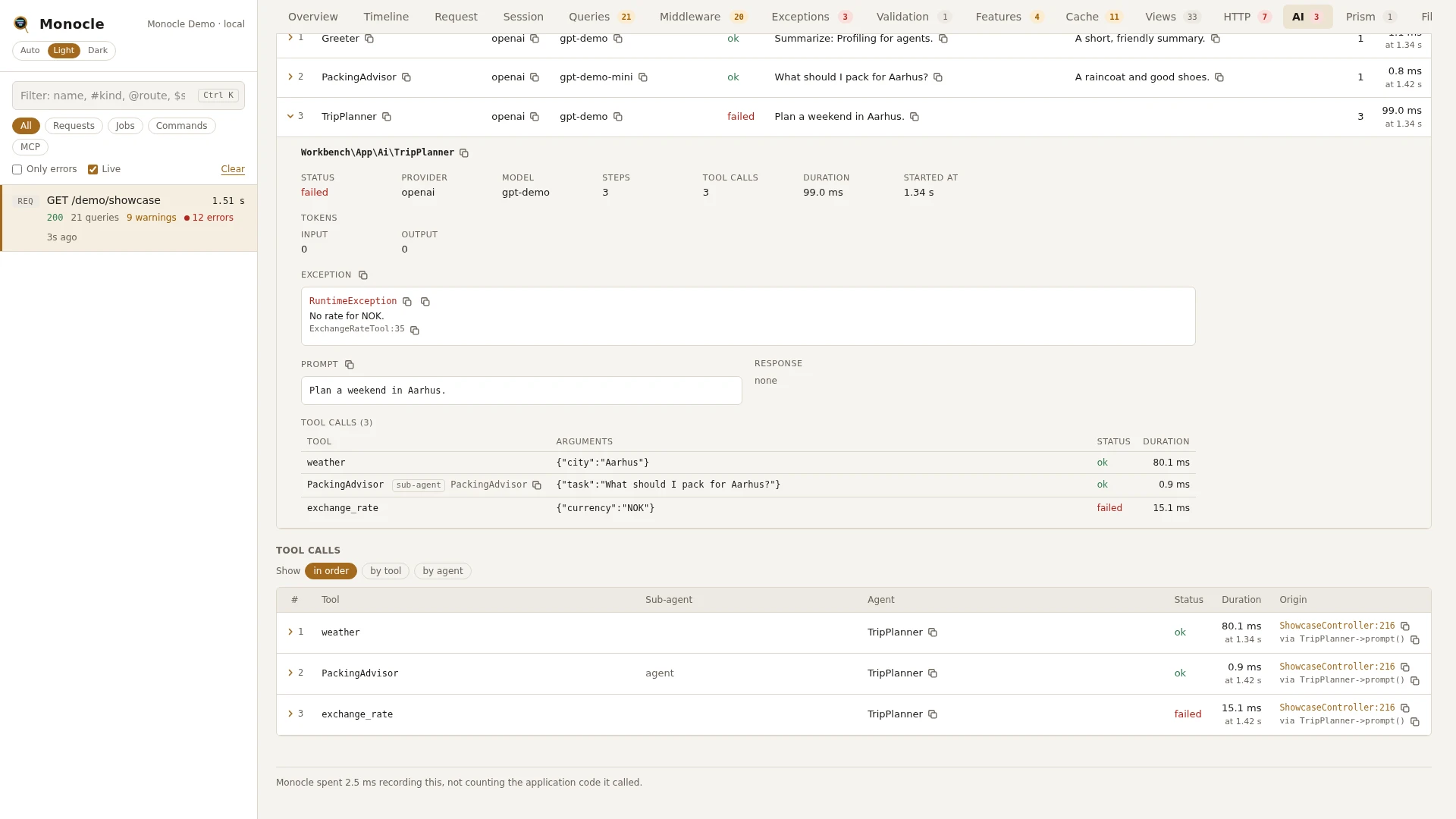
The AI tab has two tables, both in the order things happened.
- The agent runs (
ai). The columns are the fields that have a value in some row, up to eight, withdurationlast.statusis coloured. - Tool calls (
ai_tools), with the columns tool, Sub-agent, agent, status and duration, plus where in your code it came from. The Sub-agent column saysagentfor a tool that is another agent and is empty otherwise. Its chips group the tool calls by tool or by agent, each group with its count, failures and timing.
Click a row to fold it out. An agent run shows the agent class, its status, provider, model, steps, tool calls, duration and when it started, and for a sub-agent the agent that called it. Below that come the tokens (input, output, and cache read, cache write and reasoning when there are any), the exception when the run failed, and the prompt and the response (or the structured output, pretty printed) in boxes that scroll and copy. Last is a table of the tool calls the run made, each with its arguments, status and duration, sub-agents marked as such.
A tool call folds out to the tool and its class, its status, whether it is a sub-agent, the agent that called it, its duration, the exception when it failed, the arguments and the result (JSON pretty printed), and the line in your code that led to it.
The Timeline tab shows the agent, step and tool spans described above. Click a span to see its details, such as a step's tokens and finish reason.
Estimated cost
Above the tables, Token prices folds out to one line per provider/model the capture used, with a price for input, cached input and output tokens, in USD per million tokens. The prices are kept in your browser only (localStorage), so they apply to every capture you open there, on the AI and Prism tabs alike, and are not shared with anyone else.
Once every model in the capture has a price, the totals get an Estimated cost: the input tokens not read from cache at the input price, cache_read tokens at the cached price and output tokens at the output price. laravel/ai counts cache writes as input, so they are priced as input; Prism leaves them out of the input, so there they are not priced. A price left empty counts as 0. It is an estimate: providers with tiered or long-context prices charge differently.
For agents
Find the slowest tool calls in the latest capture, and whether any of them are sub-agents:
{
  "tool": "monocle-rows",
  "arguments": {
    "section": "ai_tools",
    "sort": "duration", "dir": "desc",
    "fields": ["tool", "sub_agent", "agent", "status", "duration"]
  }
}
List the agent runs that failed, with their errors and tokens:
{
  "tool": "monocle-rows",
  "arguments": {
    "section": "ai",
    "where": [{"field": "status", "op": "=", "value": "failed"}],
    "fields": ["agent", "model", "exception.message", "tokens", "duration"]
  }
}
See where the time went inside each run, step by step and tool by tool, including sub-agents:
{
  "tool": "monocle-rows",
  "arguments": {
    "section": "timeline",
    "kinds": ["ai.agent", "ai.step", "ai.tool"]
  }
}
To find captures that ran agents at all, use monocle-list with "has": ["ai"]. See For AI agents for every argument.
Configuration
Turn the lens on or off, or pass options, under lenses in config/monocle.php, keyed by AiLens::class: true runs it with defaults, false turns it off, and an array sets options. See Lenses.
| Option | Default | Effect |
|---|---|---|
max_text | null | Shortens prompts, responses and tool results to this many characters, followed by .... null keeps them whole. Arguments and structured output are never shortened. |
Other settings that affect this lens:
origin- whether tool call rows get anorigin, and how many lines of the call chain it has.except- agents run in a request or command that is not recorded are not recorded either.dashboard.tabs- where the AI tab sits among the tabs.- Masking - the API keys the providers send are masked on the HTTP client section automatically, also those in a header of their own such as Anthropic's
x-api-key; see HTTP client - AI provider keys. Tool arguments, and tool results with keys, are masked like request input. UseAiLens::classas the key undermask.inputsfor patterns that only apply here. Prompts and responses are free text and are stored as they are.
use ExeQue\Monocle\Lenses\Packages\Laravel\AiLens;

'lenses' => [
    // ...
    AiLens::class => [
        'max_text' => 2000,
    ],
],
Requirements and limits
- Needs
laravel/ai. Without it the lens does nothing. - Records only agent runs that happen while a capture is being recorded.
- Prompts, responses and plain-text tool results are not masked.
- Attachments are counted on the
ai.agentspan but not stored. ai_msandai_tool_mscount time only at the top: a sub-agent's run and its tool calls are part of the tool call that started them. A sub-agent whose caller is still running when the capture ends counts as top-level.