
Livewire
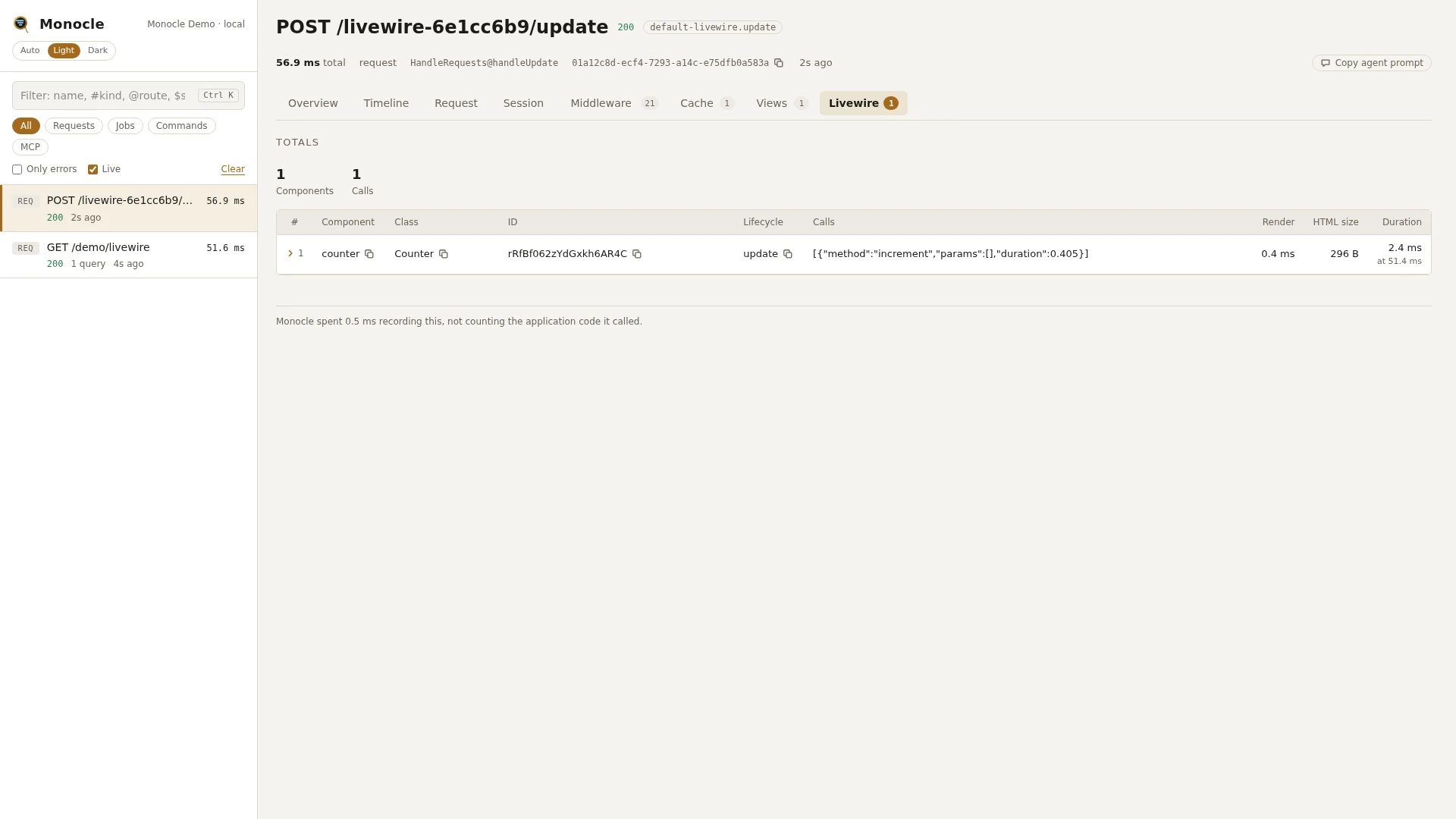
The Livewire lens records every Livewire component a request mounts or updates: the methods called on it, the properties that changed, how long it took to render and any exception it threw. It writes one row per component to section livewire, so a POST /livewire/update shows which components it was about and what they did.
Rows
| Field | Meaning | Unit | Missing when |
|---|---|---|---|
component | the component's name, such as counter or orders.table | - | never |
class | the component class | - | never |
id | the component's Livewire id | - | never |
lifecycle | mount when the component was rendered for the first time, update when an existing component was sent back to the server | - | never |
calls | the methods called on it, in order: method, params and duration (ms) | - | empty list when nothing was called |
updates | the properties set from the browser: path (such as form.email) and the new value | - | empty list when no property was set |
render_ms | how long rendering the view took | ms | null when the component did not render, such as after skipRender() |
html_bytes | the size of the rendered HTML | bytes | null when the component did not render |
exception | the exception the component threw: class, message, file and previous | - | null when nothing was thrown |
time | when the component was first seen | ms since the capture started | never |
duration | from the component being mounted or hydrated until it was dehydrated | ms | null if the component was never dehydrated |
With Filament installed, the rows of Filament components get more fields - see Filament.
Each component is also a span of kind livewire on the Timeline, named after the component, with its class and lifecycle.
Totals, warnings and errors
When the section has rows, the summary gets:
| Total | Label | Value |
|---|---|---|
livewire_components | components | the number of component rows |
livewire_calls | calls | the number of method calls over all components |
Error: one for each component with an exception, reading "Livewire component threw ExceptionClass: message".
The Livewire lens gives no warnings.
In the dashboard
The Livewire tab shows the totals above a table with one row per component, in the order they were recorded. The columns are picked from the fields that have values, such as component, class, id, lifecycle, calls, render, HTML size and duration. A row with an exception is reported on the tab as an error. The tab has no groupings. Each row folds out to all of its fields, with the calls and updates in full.
The Request tab of a Livewire update shows the response as one card per component, titled with the component name and its id:
calls- the methods called, with their parametersupdates- the properties set from the browserchanges- every property whose value changed, as field, from and todispatched- the events the component dispatched, with their parametersreturns- what the called methods returnedredirect- where the component redirected tohtml_bytes- the size of the HTML it sent back
Parameters and updates on the card are masked like request input. See Response captures.
The Timeline tab shows a livewire span per component.
For agents
Which components did the latest Livewire update touch, and what did they do?
{ "tool": "monocle-show", "id": "latest", "sections": ["summary", "livewire"] }Components that threw, with the method calls that led up to it:
{
  "tool": "monocle-rows",
  "section": "livewire",
  "where": [{ "field": "exception", "op": "not_null" }],
  "fields": ["component", "lifecycle", "calls", "updates", "exception"]
}
Where the time of a slow Livewire update went, component by component:
{ "tool": "monocle-show", "id": "latest", "sections": ["timeline"], "kinds": ["livewire"] }To find Livewire updates among recent captures, use monocle-list with "has": ["livewire"]; to leave them out, use "exclude": ["livewire.update"]. See For AI agents for every filter monocle-rows accepts.
Configuration
The lens is listed in the lenses block of config/monocle.php under its class, ExeQue\Monocle\Lenses\Packages\Livewire\LivewireLens. true runs it, false turns it off. It has no options of its own. See Lenses.
| Option | Default | Effect |
|---|---|---|
| (none) | - | the lens only takes true or false |
Other settings that affect it:
except.livewire- Livewire updates where every component name matches one of these patterns are not recorded at all. Default['pulse.*'], so the Pulse dashboard polling itself is left out.except.paths- Livewire's script, source map, JS and CSS files (livewire-*/livewire*.js,livewire-*/*.map,livewire-*/js/*,livewire-*/css/*) are not recorded by default.RequestLensoptioncapture.routes-'*livewire.update' => LivewireUpdateCapture::classgives the Request tab its component cards. Leave the entry out to keep only the raw response. See Request.- Masking -
mask.inputsmasks parameters and updates, both on thelivewirerows and on the Request tab cards. On the rows, an update is masked when its property path matches, and a method parameter when the name the method gives it matches, sologin($password)is masked however it was called. Entries keyed byLivewireLens::classapply to the rows only. FilamentLivewireLensadds Filament fields to these rows and runs only whileLivewireLensis on. See Filament.dashboard.tabs-LivewireLens::classin the list places the Livewire tab.
use ExeQue\Monocle\Lenses\Packages\Livewire\LivewireLens;
use ExeQue\Monocle\Lenses\Packages\Livewire\LivewireUpdateCapture;
use ExeQue\Monocle\Lenses\RequestLens;

'lenses' => [
    RequestLens::class => [
        'capture' => [
            'routes' => [
                '*livewire.update' => LivewireUpdateCapture::class,
            ],
        ],
    ],

    LivewireLens::class => true,
],

'except' => [
    'livewire' => [
        'pulse.*',
        'admin.live-stats',
    ],
],
Setting capture.routes replaces its default, so keep the other capture keys you want - see Request.
Requirements and limits
- Needs
livewire/livewire. Without it the lens does nothing. - Only the server side is recorded. What happens in the browser, such as Alpine code,
wire:modelchanges that are not sent to the server and JavaScript-only actions, is not. callsandupdateshold what reached the server, with matching values masked.- An update whose components all match
except.livewireis not recorded at all, not even as a request. - The first page load that mounts components is recorded with
lifecycle: mount; the update requests that follow are separate captures.