
Auth
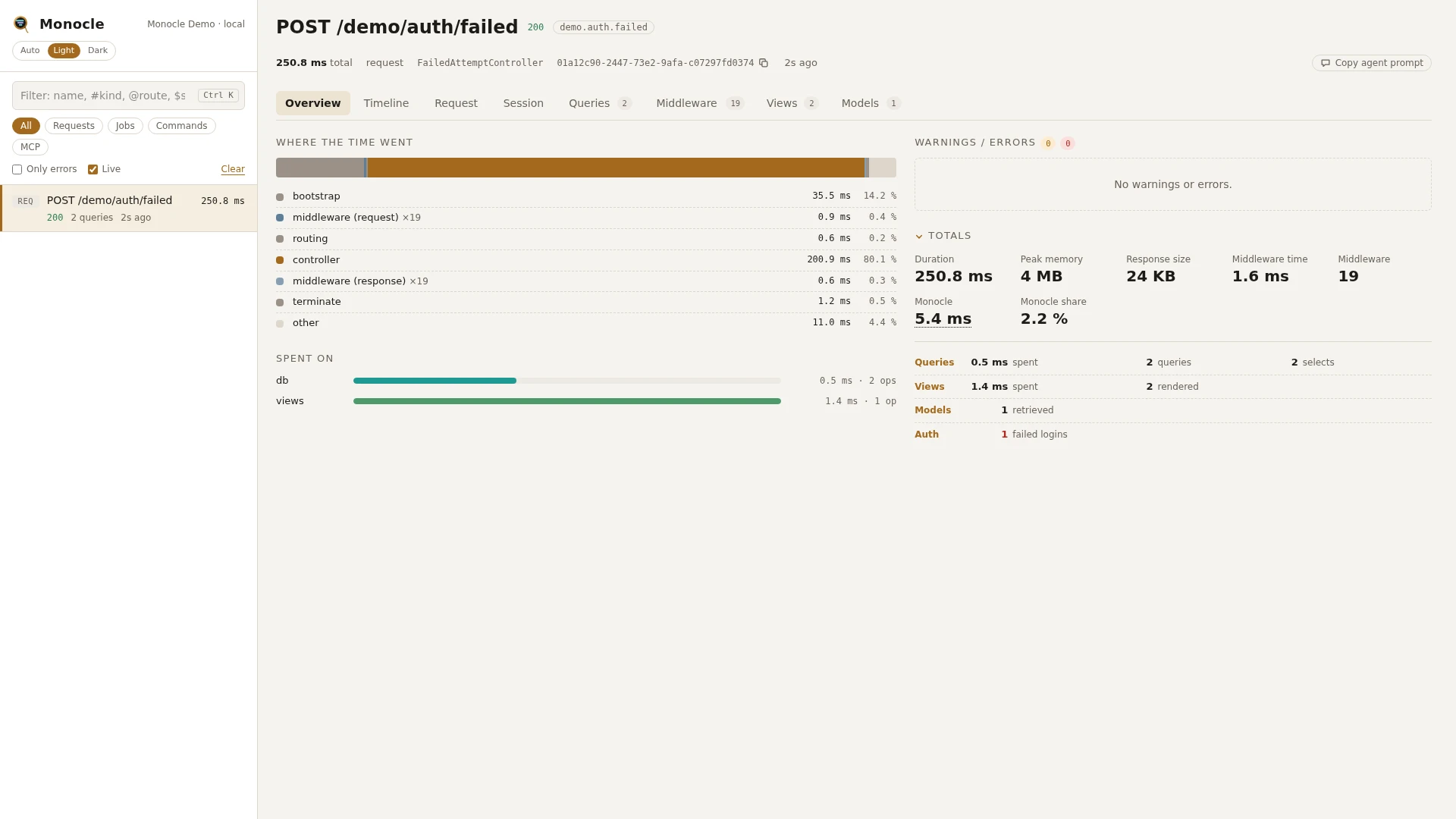
The auth lens records who a request, job or command was authenticated as and how: the guard that resolved the user, login attempts, logins, failed attempts, lockouts, logouts, registrations, email verifications and password resets. Each is one row in section auth, recorded as it happens; with Fortify, Sanctum or an impersonation package installed, their rows are added to the same section.
Rows
Every row has an event:
| Event | Recorded when |
|---|---|
authenticated | a guard resolved the current user |
attempting | a login attempt started |
login | a user logged in |
failed | a login attempt failed |
lockout | a login was locked out after too many attempts |
logout | a user logged out |
logout_current_device | a user logged out of the current device |
logout_other_devices | a user logged out of their other devices |
registered | a user registered |
verified | a user verified their email address |
password_reset | a user reset their password |
The fields of a row:
| Field | Meaning | Unit | Missing when |
|---|---|---|---|
event | one of the events above | - | never |
guard | the guard name, such as web | - | null on lockout, registered, verified and password_reset |
user | the user as Class#id, such as App\Models\User#42 | - | null on attempting and lockout, and on failed when no user matched the credentials |
remember | whether "remember me" was asked for | true or false | only present on attempting and login |
credentials | the names of the credential fields tried, such as ["email", "password"] - never their values | - | only present on attempting and failed |
ip | the client IP of the locked out request | - | only present on lockout |
time | when it happened | ms since the capture started | never |
origin | the line in your code that caused it | file and line | not recorded on authenticated rows |
Totals, warnings and errors
Totals, each added only when its condition holds:
| Total | Label | Value | Added when |
|---|---|---|---|
auth_user | user | the user of the last authenticated or login row | such a row has a user |
auth_failed | failed logins | the number of failed rows | there is at least one |
auth_lockouts | lockouts | the number of lockout rows | there is at least one |
Warning: "A login was locked out after too many attempts." when the capture has at least one lockout row. It is given once, however many lockouts there are.
The auth lens reports no errors.
In the dashboard
For a request, the auth rows are shown on the Request tab instead of a tab of their own:
- The request facts get a User line: the user and how they got in, such as
via web guard,via Sanctum token deploy-botorvia web guard, impersonated by #1 (web guard). - An Authentication table lists every row except
authenticated, with event, guard, user, details (the credential fields tried,remember, the IP, Sanctum abilities) and origin.failedandlockoutare highlighted. Clicking a row shows all of its fields.
For a job or command, the rows get an Auth tab: one table row per event, each folding out to all of its fields. The tab has no groupings.
The totals appear on the Overview tab under Auth.
For agents
Who was the latest request authenticated as, and did a login fail or get locked out?
{ "tool": "monocle-show", "id": "latest", "sections": ["summary", "auth"] }The failed login attempts of a capture, with the fields tried and where they came from:
{
  "tool": "monocle-rows",
  "section": "auth",
  "where": [{ "field": "event", "op": "=", "value": "failed" }],
  "fields": ["event", "guard", "user", "credentials", "origin"]
}
Recent captures that recorded anything about authentication:
{ "tool": "monocle-list", "has": ["auth"], "since": "15m" }See For AI agents for every filter monocle-rows accepts.
Configuration
The lens is listed in the lenses block of config/monocle.php under its class, ExeQue\Monocle\Lenses\AuthLens. true runs it, false turns it off. It has no options of its own. See Lenses.
| Option | Default | Effect |
|---|---|---|
| (none) | - | the lens only takes true or false |
Other settings that affect it:
- Turning
AuthLensoff also stops the Fortify, Sanctum and impersonation rows, since they are added to its section. origindecides how theoriginof each row is recorded.dashboard.tabsorders the tabs. The auth rows of a request are always shown on the Request tab; the Auth tab of a job or command can be placed by addingAuthLens::classto the list.- Masking does not apply: credential values are never recorded in the first place.
use ExeQue\Monocle\Lenses\AuthLens;

'lenses' => [
    AuthLens::class => true,
],
Impersonation
With an impersonation package installed, section auth also records an impersonation starting and ending, and marks who is really behind the user while an impersonation lasts.
| Package | Lens |
|---|---|
lab404/laravel-impersonate | ExeQue\Monocle\Lenses\Packages\Lab404\ImpersonateLens |
stechstudio/filament-impersonate | ExeQue\Monocle\Lenses\Packages\STS\FilamentImpersonateLens |
laravel/nova | ExeQue\Monocle\Lenses\Packages\Laravel\NovaLens |
franbarbalopez/mirror | ExeQue\Monocle\Lenses\Packages\Mirror\MirrorLens |
Rows it adds:
| Event | Fields |
|---|---|
impersonation_started | user: the impersonated user as Class#id; impersonated_by: the impersonator as Class#id; guard is null |
impersonation_ended | the same fields, when the impersonation is left |
While an impersonation lasts, every authenticated row gets an impersonated_by field with the impersonator's id and guard, such as #1 (web guard). It is read from the session the package keeps, so no user is loaded from the database. The request that leaves an impersonation, where the impersonator is logged back in, is not marked.
The summary gets the total auth_impersonated_by (label "impersonated by"): the impersonated_by of the last authenticated row. The capture is tagged impersonated by #1 (web guard) in the dashboard's header and in the capture list, and the User line on the Request tab says so too. Impersonation adds no warnings or errors.
Configuration
Each lens is true in the lenses block by default and does nothing until its package is installed. It has no options; set it to false to stop it. It runs only while AuthLens is on.
The impersonator is read from the session keys each package uses, so these package settings affect it: laravel-impersonate.session_key and laravel-impersonate.session_guard for lab404, nova.guard for Nova (when the session holds no guard) and mirror.session.key for Mirror. filament-impersonate uses the fixed keys impersonated_by and impersonator_guard.
use ExeQue\Monocle\Lenses\Packages\Lab404\ImpersonateLens;
use ExeQue\Monocle\Lenses\Packages\Laravel\NovaLens;
use ExeQue\Monocle\Lenses\Packages\Mirror\MirrorLens;
use ExeQue\Monocle\Lenses\Packages\STS\FilamentImpersonateLens;

'lenses' => [
    ImpersonateLens::class => true,
    FilamentImpersonateLens::class => true,
    NovaLens::class => true,
    MirrorLens::class => false,
],
Fortify
With laravel/fortify, section auth also records two-factor authentication and password changes. Lens: ExeQue\Monocle\Lenses\Packages\Laravel\FortifyLens.
| Event | Recorded when |
|---|---|
2fa_challenged | a user was asked for a two-factor code |
2fa_passed | a valid two-factor code was given |
2fa_failed | a wrong two-factor code was given |
2fa_enabled | two-factor authentication was turned on |
2fa_confirmed | two-factor authentication was confirmed |
2fa_disabled | two-factor authentication was turned off |
recovery_codes_generated | new recovery codes were generated |
recovery_code_used | a recovery code was used and replaced |
password_updated | a user changed their password through Fortify |
Each row has event, user (Class#id), time and origin; guard is null. Recovery codes and two-factor secrets are never recorded.
The summary gets the total auth_2fa_failed (label "failed 2FA challenges"), the number of 2fa_failed rows, when there is at least one. Fortify adds no warnings or errors.
Configuration
FortifyLens is true in the lenses block by default, has no options, and does nothing until laravel/fortify is installed. It runs only while AuthLens is on.
use ExeQue\Monocle\Lenses\Packages\Laravel\FortifyLens;

'lenses' => [
    FortifyLens::class => true,
],
Sanctum
With laravel/sanctum, section auth also records the personal access token a request authenticated with, as a row with event token. Lens: ExeQue\Monocle\Lenses\Packages\Laravel\SanctumLens.
| Field | Meaning | Missing when |
|---|---|---|
event | token | never |
guard | sanctum | never |
user | always null; see owner | always |
token_id | the token's id | never |
token_name | the name the token was created with | the token has no name |
abilities | the token's abilities, such as ["orders:read"] | the token has none |
owner | the token's owner as Class#id | the token has no owner |
time, origin | as on other auth rows | never |
On the Request tab, the User line shows the owner via Sanctum token <name>, and the Authentication table lists the abilities. Sanctum adds no totals, warnings or errors.
Configuration
SanctumLens is true in the lenses block by default, has no options, and does nothing until laravel/sanctum is installed. It runs only while AuthLens is on. The token value is never recorded; the Authorization header it came in is masked on the Request tab by the default masking settings.
use ExeQue\Monocle\Lenses\Packages\Laravel\SanctumLens;

'lenses' => [
    SanctumLens::class => true,
],
Requirements and limits
- The auth lens needs nothing beyond Laravel. Fortify, Sanctum and the impersonation lenses need their package and run only while
AuthLensis on. - Only Laravel's auth events (and the events of the packages above) are recorded. A guard that never fires
Authenticated, or a login done without Laravel's events, does not show up. - Credential values, passwords, recovery codes and token values are never recorded.
- Sanctum token rows need a
laravel/sanctumversion that firesTokenAuthenticated. Requests authenticated with Sanctum's session cookie (SPA authentication) get no token row. impersonated_byis only added where there is a session to read it from, so requests on a stateless guard are not marked.