
Releases
A release is the version of your app that handled a request or threw an error, such as a commit hash or a version number. Comparing releases shows which deploy broke something.
Reporting the release
Every request, error and log line carries the release it ran on:
- Server: the SDK sends it with every batch; its docs say where it takes it from. In the raw ingest API it is the
releasefield of a batch, see Ingest and API. - Browser: the browser script takes it from its
data-releaseattribute.
A release shows up on the Releases page as soon as something on it arrives.
The Releases page
Releases in a project's sidebar lists the releases seen in the period, newest first, for the period and environment picked at the top.
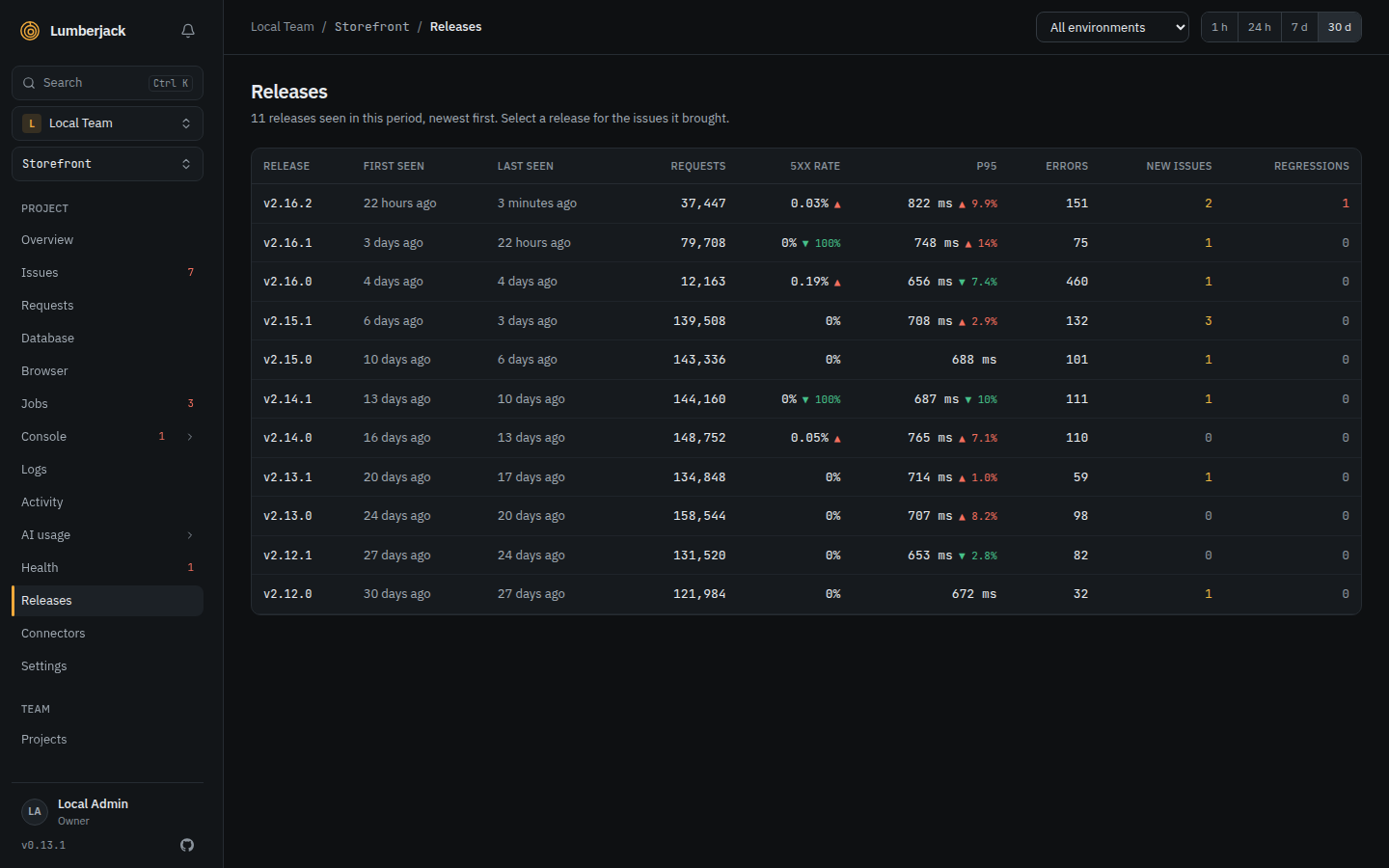
| Column | Shows |
|---|---|
| First seen | The first request or error on the release in the period. |
| Last seen | The last request or error on it in the period. |
| Requests | Requests served by the release. |
| 5xx rate | The share of those requests that ended in a server error. |
| p95 | The 95th percentile response time. |
| Errors | Occurrences of any issue on the release. |
| New issues | Issues first seen in the period whose earliest occurrence carried this release. |
| Regressions | Resolved issues that came back with an occurrence on this release. |
The arrows
Next to the 5xx rate and p95 an arrow shows the change from the release before: red and up when it got worse, green and down when it got better, red without a percent when the release has server errors and the one before had none.
The issues a release brought
Click a release to open a dialog with its new issues with their error counts. Issues last seen in this release opens the issues list filtered by that release.
A new issue belongs to the release of its earliest occurrence, in the picked environment if there is one.
Releases elsewhere
- Issues list: the Release filter, see The issues list.
- Regression alerts: the mail names the release the issue came back in, with a Compare releases link to this page.
- Status screens: data widgets can be limited to All releases, the Current only or the Previous one, and the Current release stat shows the release running now. See Scope and Stat.
- Metrics API:
GET /projects/{p}/releases, see the Metrics API.
The new release notification
When a project's server reports a release for the first time, members can get a Releases notification: "New release in Shop". It is off by mail and on in app by default; change it under Notifications. The first release a project ever reports sends nothing, nor do releases reported only by the browser script.
The new release alert
The New release alert rule sends to your channels when an environment reports a release for the first time, with the version, environment and host. A release that reaches staging and later production sends one alert for each; limit the rule to production with its environments to hear only about that. The first release an environment ever reports sends nothing. Several hosts reporting the same release send one alert.
Limits
| What | Limit |
|---|---|
| Release name | 64 characters |
| Releases in the issues list filter | 20 newest |
| New issues listed for a release | 25 |