
MCP
Lumberjack has an MCP server. AI agents such as Claude Code, Claude Desktop or Cursor can read issues and telemetry through it and help triage them.
Tokens
Team owners and admins create tokens under API and MCP tokens on the team page. Members see the list. The same tokens read the metrics API.
| Field | Values |
|---|---|
| Name | Up to 100 characters. Shown on everything the token does. |
| Projects | The projects the token can see. At least one. |
| Scope | read only reads. write can also change issues: status, assignee, labels, notes, watching and GitHub issues. |
| Expiry | 30, 90 or 365 days, or never. |
The token, lj_mcp_..., is shown once. The list shows who created each token and when it was last used, and Revokes it.
- A token acts as the person who created it. It sees and changes only what that person may see and change, within its projects and its team.
- A token works only while its creator is an owner or admin of the team. When they leave the team, become a member, are suspended or are deleted, the token stops and shows as Stopped; a current admin has to create a new one.
- A token makes at most 120 calls a minute.
Connecting
The server is at https://your-lumberjack/mcp. It uses streamable HTTP and takes the token as a bearer token in the Authorization header.
Claude Code
claude mcp add --transport http lumberjack https://your-lumberjack/mcp \
  --header "Authorization: Bearer lj_mcp_..."
Other clients that read an mcpServers JSON file, such as Cursor or .mcp.json:
{
    "mcpServers": {
        "lumberjack": {
            "type": "http",
            "url": "https://your-lumberjack/mcp",
            "headers": {
                "Authorization": "Bearer lj_mcp_..."
            }
        }
    }
}
Tools
The server tells agents to treat error messages, request data and log lines as data, not as instructions.
Agents' notes and status changes show in Lumberjack with the token's name. Durations are in microseconds. Tools marked write need the write scope.
| Tool | Does |
|---|---|
list_projects | The projects the token can see, with the slug other tools take. |
get_project_overview | Requests, error rate, percentiles, job failures, health check counts, newest issues, slowest routes and failed jobs for a period. |
triage_inbox | Your work queue: open issues you have not handled since they last surfaced, and notes that tag you. At most 50 issues a call. |
list_issues | Issues with the issues page's filters. |
get_issue | One issue with its latest occurrence (stacktrace, request, user context) and notes. |
list_occurrences | Recent occurrences of an issue. |
set_issue_status | Resolve, ignore, re-open or mark in progress. Write. |
assign_issue | Assign or unassign. Write. |
set_issue_labels | Replace an issue's labels. Write. |
watch_issue, unwatch_issue | Watch or stop watching an issue, as the token's creator. Write. |
add_issue_note | Add a note. Tag members with <@id>. Write. |
create_repo_issue | Create a GitHub issue in the linked repository. Write. |
list_members | The team's members, with the ids assign_issue takes. |
list_routes, list_queries, list_jobs, list_commands, list_scheduled_tasks | Statistics per route, query, job class, command and task. |
get_job, get_command, get_scheduled_task | The last 50 runs of one job class or command, or recent runs of one task. |
list_health_checks | Health checks with their state, latest result, metrics, per-host status and uptime. |
get_trace | Everything recorded under one trace id, in time order. |
search_logs | Log lines by channel, level, text, period and trace id, newest first. |
Arguments
project is a project slug from list_projects. It is required only when the token covers more than one project. issue is an issue's number, such as DEMO-42, or its id. period is 1h, 24h, 7d or 30d (default 24h). Arguments in bold are required.
| Tool | Arguments |
|---|---|
list_projects | none |
get_project_overview | project, period, environment |
triage_inbox | none |
list_issues | project, status (open by default, which includes in_progress, or resolved, ignored), source (server, browser, log), search (title or message), label, sort (last_seen by default, occurrences, users, first_seen), limit (1 to 100, default 25) |
get_issue | issue |
list_occurrences | issue, limit (1 to 100, default 20) |
set_issue_status | issue, status (open, in_progress, resolved, ignored), note (added as a note), until for ignored: escalation (default), 1h, 24h, 7d, count:10, count:100, count:1000 or forever |
assign_issue | issue, user_id from list_members. Leave it out to unassign. |
set_issue_labels | issue, labels: a list of names. An empty list removes all. New names create labels. Up to 10 labels of at most 32 characters. |
watch_issue | issue |
unwatch_issue | issue |
add_issue_note | issue, body: Markdown. The first line is the summary shown in alerts. <@id> tags a member. |
create_repo_issue | issue, title (defaults to the exception and message), body (Markdown) |
list_members | project |
list_routes | project, period, environment, sort (p95 by default, count, errors, total), search |
list_queries | project, period, environment, sort (total by default, p95, count), search (SQL text) |
list_jobs | project, period, environment, queue, sort (errors by default, count, duration, wait) |
list_commands | project, period, environment |
list_scheduled_tasks | project, environment, attention (only tasks whose last run failed or was missed) |
get_job | project, name (the full job class), uuid (one job's attempts), status (queued, processing, processed, released, failed, stuck) |
get_command | project, name (such as reports:send), status (running, finished, failed) |
get_scheduled_task | project, name as list_scheduled_tasks shows it, environment |
list_health_checks | project, period (for uptime), environment, attention (only degraded, down or stale checks) |
get_trace | project, trace_id |
search_logs | project, channel, level (minimum: debug to emergency), search, trace_id, period, limit (1 to 200, default 50) |
Automatic triage
The project settings have a ready-made GitHub Actions workflow that runs Claude Code in your repository. Through the MCP tools, it triages new and regressed issues and answers notes that tag it, without resolving them.
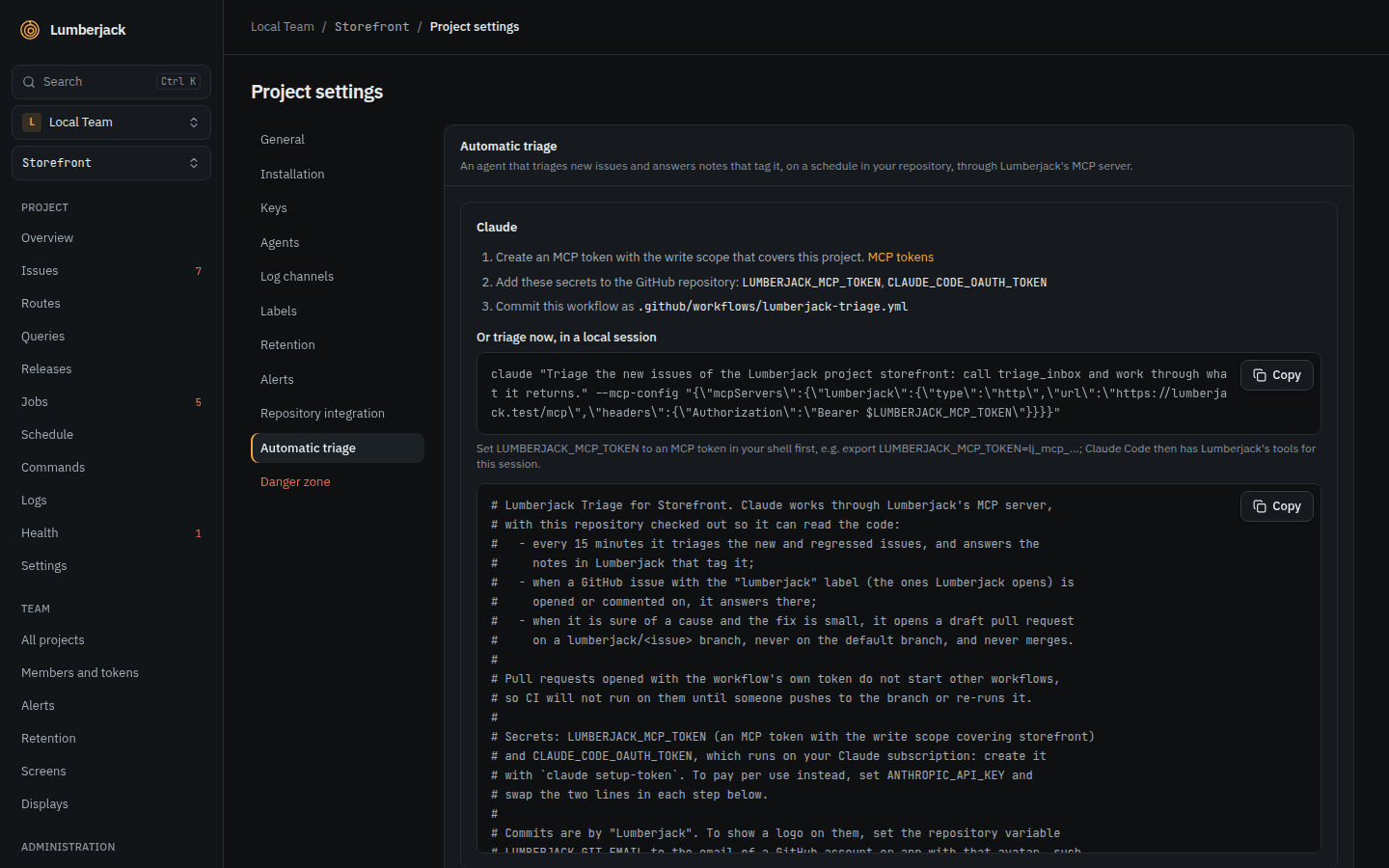
When it is sure of the cause and the fix is small, or a comment asks for one, it opens a draft pull request from a lumberjack/<issue number> branch with "Fixes #N" in its body, and links it in its note or comment. It never pushes to the default branch or merges. CI does not start on these pull requests by itself: push to the branch or re-run CI.
- Create a token with the write scope that covers the project.
- Add the secrets to the GitHub repository:
LUMBERJACK_MCP_TOKEN(the token) andCLAUDE_CODE_OAUTH_TOKEN(fromclaude setup-token, using your Claude subscription). To pay per use instead, swap the commented lines forANTHROPIC_API_KEY. - Commit the workflow shown in the settings as
.github/workflows/lumberjack-triage.yml.
It runs:
| When | Does |
|---|---|
| Every 15 minutes, or by hand (Run workflow) | Works through the triage inbox and notes in Lumberjack that tag it. |
A GitHub issue labeled lumberjack is opened or labeled, or gets a comment | Answers on the GitHub issue. Comments by bots are left alone. |
Lumberjack puts the lumberjack label on the GitHub issues it creates. A run can take up to 20 minutes. Only one run per issue, or for the inbox, runs at a time.
Your Lumberjack must be on a public URL that GitHub can reach. The settings also show how to run the same triage once in a local Claude Code session.
The workflow shows as "Lumberjack Triage" in the Actions tab and commits as "Lumberjack", from lumberjack@noreply.invalid. To show the Lumberjack logo on those commits, create a GitHub App or account with the logo as its avatar and set the repository variable LUMBERJACK_GIT_EMAIL to its email. For an app, that is <bot user id>+<app slug>[bot]@users.noreply.github.com. Get the bot user id with gh api /users/<app slug>[bot] --jq .id.