
AI usage
Lumberjack records every call your apps make to an AI model: which provider and model, how many tokens went in and out, how long it took, whether it failed, which API key it was made with, whose key that is and who caused the call. The prompt and the answer are never sent.
Recording AI calls
The Laravel library records the calls made through laravel/ai and Prism, and has a method to report others by hand; its docs show how. In the raw ingest API a call is an event of type ai_call in a batch, see AI call events. Apps instrumented with OpenTelemetry send their GenAI spans, see OpenTelemetry.
A call has:
- A provider and a model, such as
anthropicandclaude-sonnet-4-5. A call without either is skipped. - An operation:
text,structured,stream,embeddings,image,audio,transcriptionorrerank. An operation Lumberjack does not know yet is kept astext, so its tokens still count. - Tokens: input, output, cache read, cache write and reasoning, each left empty when the provider does not report it. Input is all input, cached tokens included, as OpenTelemetry counts it. The library makes every provider report it that way.
- A status, ok or error, with the error's name when it failed.
- The key it was made with, as a fingerprint, with a label and an owner; see below.
- An actor, optional: who caused the call.
Each one also gets the batch's environment, release and host, the trace it was made in, and, for agents, the invocation and the step within it.
Every call is recorded
AI calls are accounting, not performance samples. They are always recorded at a sample rate of 1: the library never samples them, and a request or job that was not sampled still reports its AI calls.
Keys
The API key never leaves your app. The app sends a SHA-256 of the provider's driver and the key (sha256("anthropic:" + key)). The driver is the vendor (openai, anthropic, the value of gen_ai.provider.name), not a name the app gave its connection, so the same key always gets the same fingerprint. Lumberjack keeps only an HMAC of that hash, made with a secret of the project's own: the key's fingerprint. Neither the key nor the hash the app sent is stored or logged. The same key gives a different fingerprint in every project, so a fingerprint says nothing about the key outside the project it belongs to. The first 8 characters of a fingerprint serve as the key's short id.
The project's secret is made when the project is created and is never rotated: a new secret would give every key a new fingerprint and cut its history in two.
A key can carry:
- A label, such as
prod-primary, to tell the keys apart. - An owner: whose key it is, as a type and a key, such as
tenantand42, for apps where customers bring their own key.
A key keeps its label and owner until a call names new ones; a call without them changes neither.
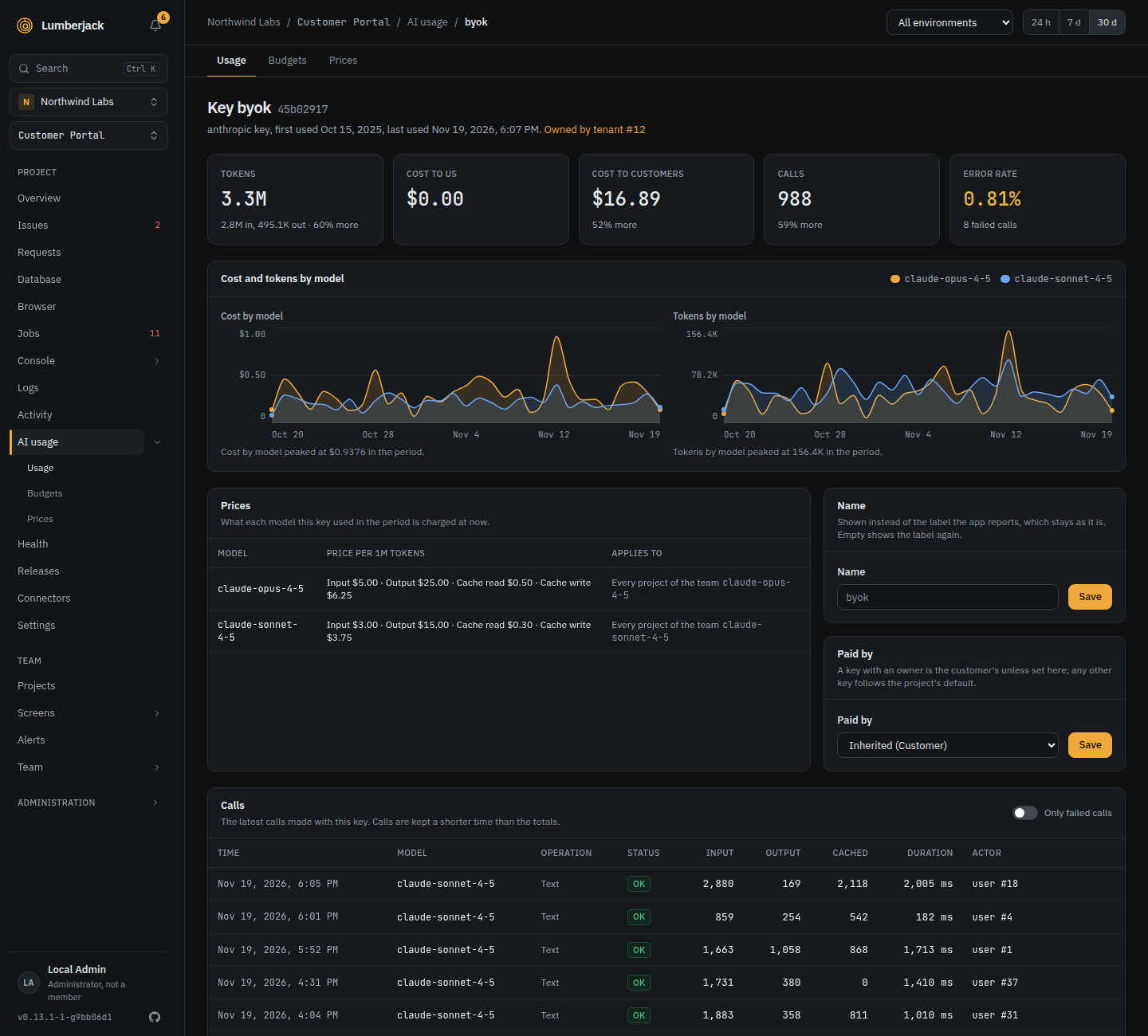
You can also give a key a name in Lumberjack, on the key's page (it takes the right to change the project). The name is shown everywhere in place of the label, which stays as the app reports it and still shows beside the name on the key's page. Calls never change the name; empty it to show the label again. A key with neither shows by its short id.
Owner and actor
The owner belongs to the key: who pays for it. The actor belongs to the call: who caused it, as a type and a key, such as App\Models\User and 17. The library uses the signed in user unless the app names another actor. So a tenant's key (the owner) can be used by many of that tenant's users (the actors), and usage can be counted both per key and per actor.
A call made with an owned key that names no owner of its own counts as the key owner's, on the pages and in what it costs. It is the key's current owner that counts, for all of its calls that named no owner, past ones too: give a key a new owner and its history moves with it.
Lumberjack only gets the type and key of an owner and an actor, never a name or an email address.
Totals
Lumberjack adds every call to two totals, which outlive the calls themselves:
- Hourly, per environment, provider, model, key and owner.
- Daily, per environment, provider, model, key, owner and actor.
The AI usage pages
Open a project and pick AI usage in the sidebar. Until the project has recorded an AI call, the page points here.
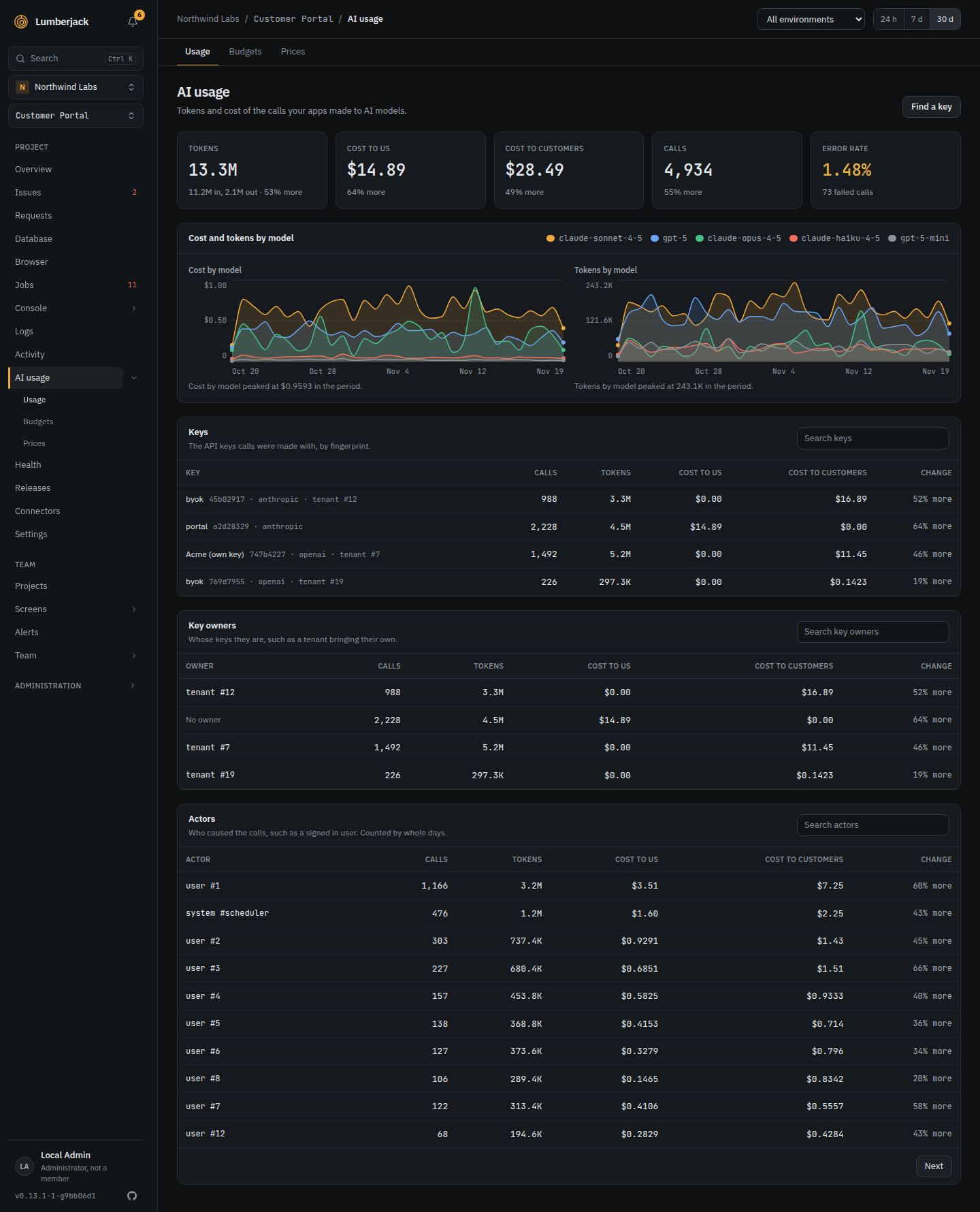
- Usage shows the period's tokens, the cost to you and to your customers, the calls and the error rate, each against the period before, with a warning when some tokens have no price. Usage is kept by the hour (a day on an actor's page), and the current period holds the part of its last hour (on an actor's page, the day) gone by, so the period before also holds that share of the hour (on an actor's page, the day) just before it: at half past, half of it. Below them, cost and tokens over time per model (the five costliest, the rest as one line), and the keys, the key owners and the actors that cost the most, each with a search (a key by its name, label, short id, provider or owner; an owner or actor by its type and id), pages and the change against the period before.
- A key's page shows its usage and cost over time, the price each model it used is charged at, who pays for it and its latest calls, all of them or only the failed ones.
- A key owner's and an actor's page show their usage and cost over time and per key.
- A key's, a key owner's and an actor's page also show the budgets that count them, when there are any.
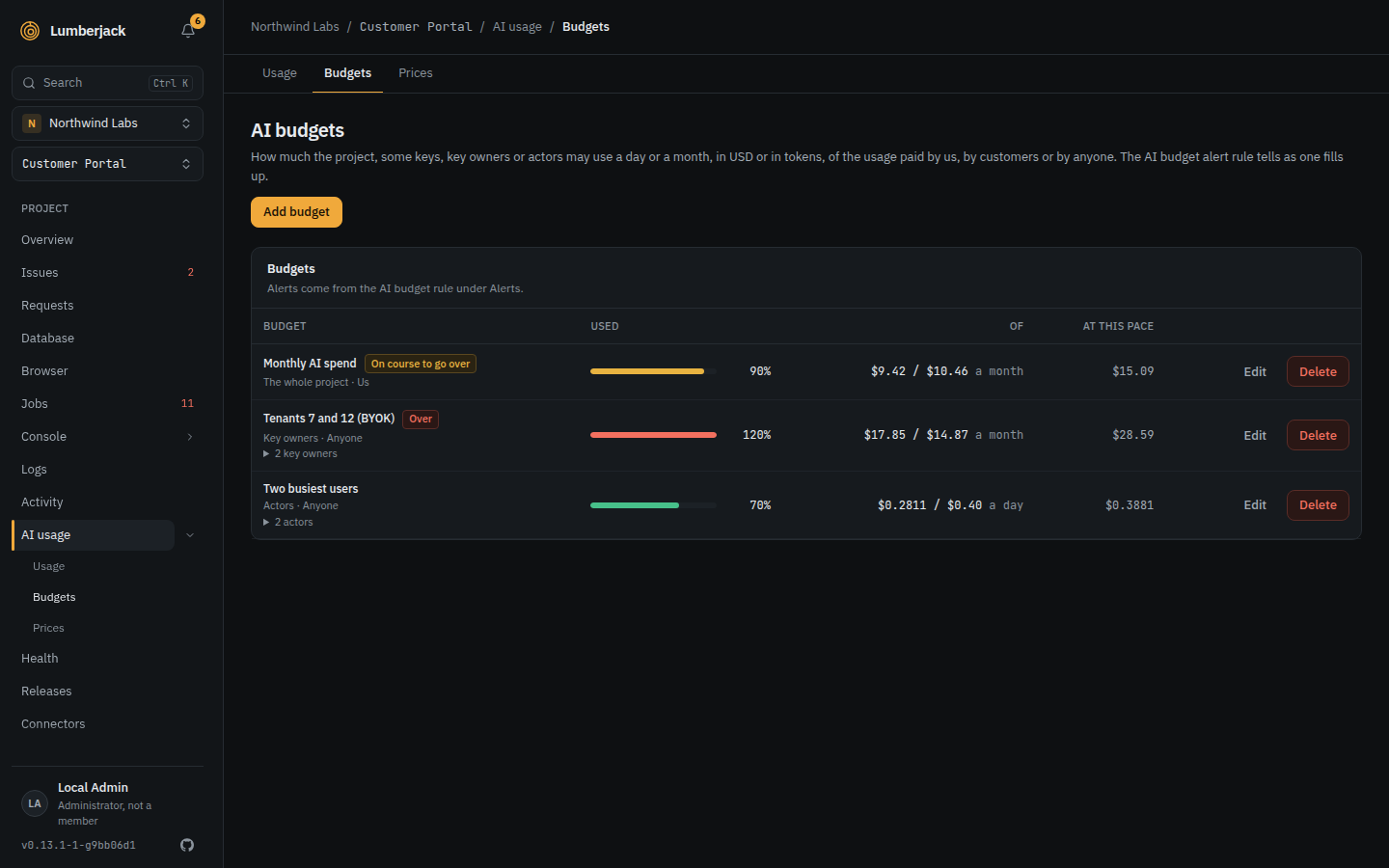
- Budgets lists the project's budgets and how far each is.
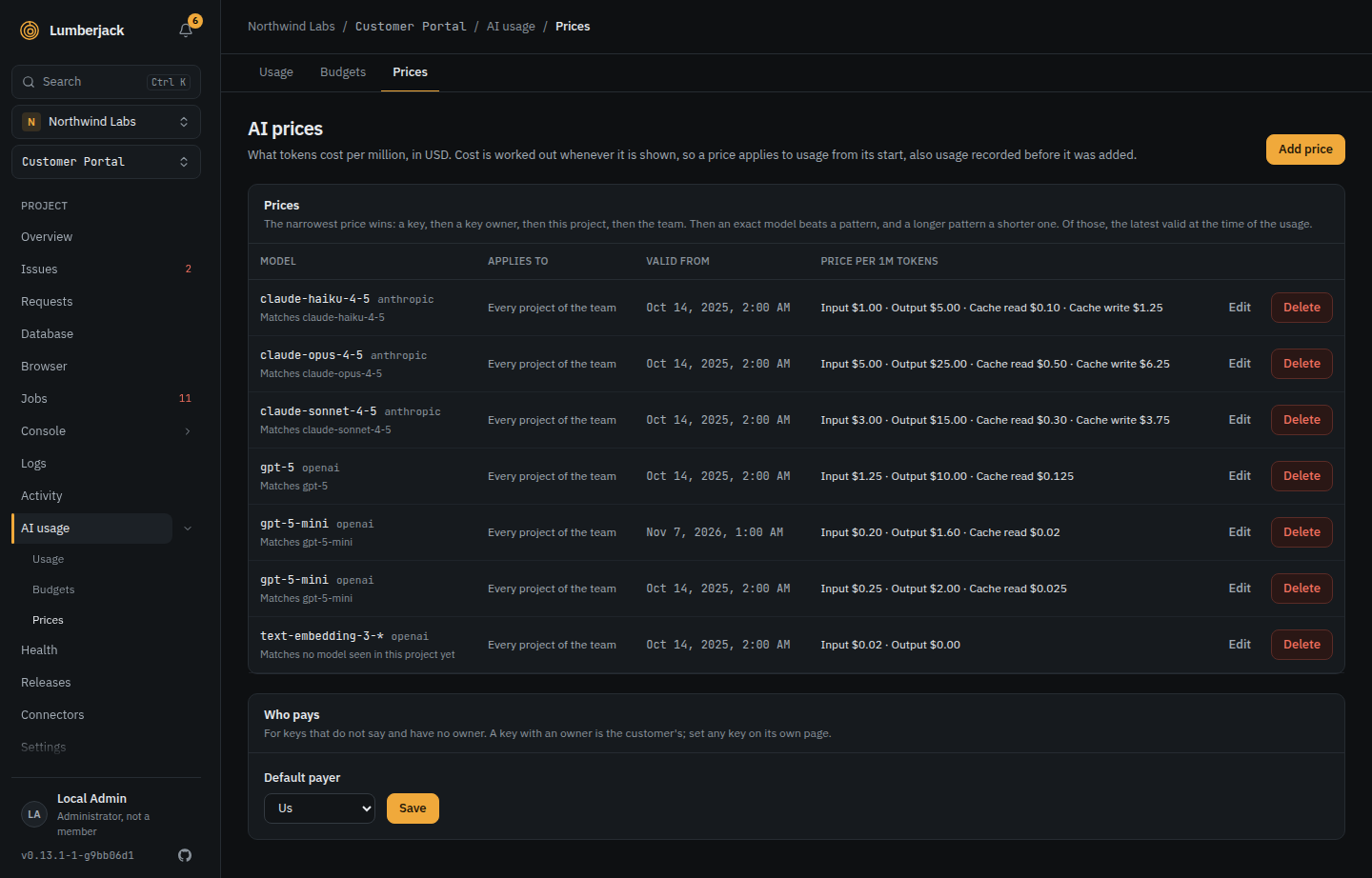
- Prices lists the prices that apply to the project, its own and its team's, and who pays for keys that do not say.
Keys and key owners are counted from the hourly totals. Actors are only in the daily totals, so their figures count whole days: over 24 hours they show yesterday and today, and over the last hour today alone, or yesterday and today while that hour reaches back past midnight. They compare with as many whole days before as they span, and today with the share of the day before it that has gone by of today.
Cost
Lumberjack works out what the tokens cost from the prices whenever a page is shown; cost is never stored. A price added or corrected later therefore also prices the usage recorded before it, from its valid from on. A new price is valid from the start of the day of the oldest AI call kept, so it prices all of it; set a later moment for a price that changed.
For each model and key, cost is, per million tokens:
- Uncached input: input less the cache reads and writes (never below 0), at the input price. Input counts cached tokens, see A call has.
- Cache reads and cache writes at their own prices, or at the input price when the price leaves them empty.
- Output at the output price. Reasoning tokens are part of the output, as OpenAI and Anthropic count them. With a reasoning price, that share of the output is charged at the reasoning price instead; without one, it is charged as output.
The hourly totals are priced with the price valid at the start of each hour, the daily totals with the price valid at the start of each day. So when a price changes in the middle of a period, each side of the change gets its own price. On the day a price starts in the middle of the day, the figures from the hourly totals (the totals, the chart, keys and key owners) and those from the daily totals (actors) can disagree: the hours after the change get the new price, the whole day the old one. Tokens no price applies to are counted as unpriced, cost nothing and are named on the page.
Prices
A price says what a model's tokens cost per million, in the team's currency: input, output, and optionally cache read, cache write and reasoning. Add them under AI usage, Prices; changing them takes administering the team.
A price applies to:
- Every project of the team, or this project alone.
- A key owner: the keys of one owner, such as
tenant7, in this project, and the calls made for that owner without a key. A call made with an owned key that names no owner of its own gets its key's owner's price. - One key of this project.
It matches a provider (or any, when empty) and a model, by name or by a pattern with *, such as claude-sonnet-*. The form shows which of the models the project used in the last 90 days a pattern matches as you type.
When several prices match a call, the narrowest wins: a key, then a key owner, then the project, then the team. Between prices as narrow, an exact model name beats a pattern, one for a provider beats one for any, and a longer pattern beats a shorter one. Of those, the one valid latest at the time of the usage applies. A narrower price that is not valid yet leaves the broader one in place until it is.
Currency
A team has one currency, USD unless changed on the team page (Members and tokens, Currency), as an ISO 4217 code such as EUR. Prices are not converted when it changes: they are read in the new currency.
Who pays
Cost is split into cost to us and cost to customers, by who pays for each key:
- What the key's page says, when set.
- Else the customer, for a key with an owner: an owner means a customer brought the key.
- Else the project's default, under Prices, Who pays: us, unless changed.
Calls made without a key follow the project's default, unless they name an owner: then the customer pays. The payer counts for all of a key's usage, before the change too.
Budgets
A budget says how much AI a project may use per day or per calendar month, as cost in the team's currency or as tokens. It counts one of:
- The whole project.
- Keys: one or more keys of this project, counted together. A key the project has forgotten stays in the budget, shown as no longer seen, until you take it out.
- Key owners: one or more, such as
tenant7andtenant12, counted together: the calls made for any of them, with or without a key, and the calls made with their keys that name no owner of their own. A call is counted once, however many ways it matches. - Actors: one or more, counted together.
Pick keys, owners and actors in the budget's form by searching for them, grouped by provider or type: a key by its name, label, short id, provider or owner; an owner or actor by its type and id; * stands for any text. Before you type, and for what you type, each provider or type shows its 20 used most lately, of the 25 providers or types used most lately. Keys are found however long ago they were used. Owners are the ones calls named in the last 90 days and the owners of keys, by the day each was last used; actors are the ones calls named in the last 90 days. Add an owner or actor not seen yet by its type and id. Changing which ones a budget counts starts its alerts over.
Add them under AI usage, Budgets; changing them takes the right to change the project. The page lists each budget with what it used so far in its current period, the share of the budget that is, and what it will have used by the period's end at its pace so far (a straight line from the period's start). A key's, owner's and actor's pages show the budgets that count them, also a budget that counts others too.
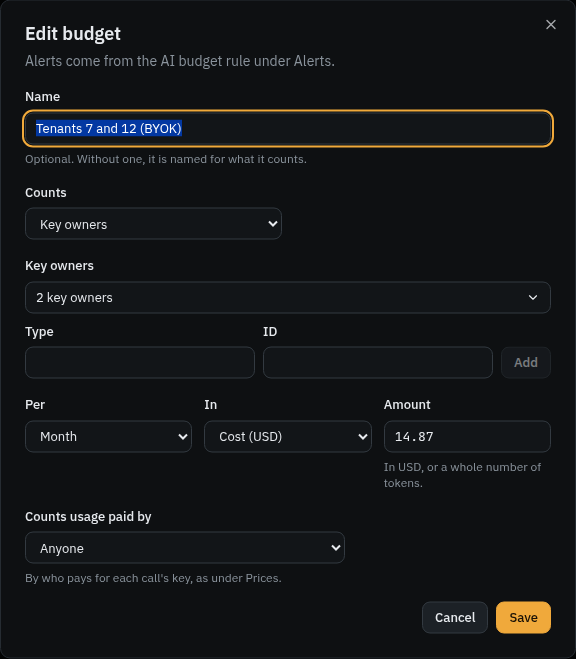
A budget also says whose usage it counts, by who pays for each call's key: us, customers or anyone. A new budget for the whole project or keys counts what you pay for, one for key owners or actors counts everything; change it in the budget's form. Cost and tokens are both counted that way.
Days and months begin at midnight UTC, as the daily totals do, so a budget's day is the same day the totals count. Cost is worked out with the prices as everywhere else, so tokens without a price count nothing toward a cost budget. Actor budgets are counted from the daily totals, the others from the hourly ones. Both totals, and the keys they name, are kept at least from the start of last month whatever their retention says, so a month and the one just ended can be counted.
The AI budget alert rule tells as a budget passes its thresholds (80% and 100% by default) and when it is on course to go over, each once per period. A period that ended is measured once more to its end, five minutes after it, so what was spent in its last minutes is told too; that alert goes out on the same terms as any other. Changing what a budget counts, its period, its basis or whose usage it counts starts its alerts over. Changing its amount keeps only the thresholds it is still past at the new amount, so a raised budget tells again as it fills up, and it may warn again of an overrun to come. An alert still on its way when the budget changes goes out only if it still holds: one for a threshold the new amount is still past does, one for a budget that now counts something else does not.
Finding a key
Find a key on the AI usage page opens a key's page from the key itself: paste the key. Your browser hashes it the way the library does (sha256(driver + ":" + key)), once for each driver the project's keys were reported with, then for the drivers of laravel/ai and Prism (openai, anthropic, gemini and the rest), and sends only those hashes; the key never leaves the browser. Lumberjack makes the fingerprints from the hashes as it does for a call and opens the key that matches, or says no call was made with it. The hash is not kept. Calls arrive the same way: the hash an app sends is turned into the fingerprint before the batch is queued, so it is never stored, not even in the queue. Hashing needs a secure page: open Lumberjack over HTTPS.
Retention
AI usage has its own group in retention:
| Data type | Kept by default |
|---|---|
| AI calls | 30 days |
| Hourly AI usage | 400 days |
| Daily AI usage | 400 days |
A key is forgotten once it has not been used for longer than the longer of the two totals is kept.