
Alerts
Alerts tell your team about new errors, regressions, queue backlogs and failing health checks. Channels say where a message goes, rules what is sent. The team's rules apply to every project, and a project can customize any of them.
Channels
Channels on the team's Alerts page are shared by every project. A project can also have channels of its own, in its settings.
| Type | What it needs |
|---|---|
| An email address. | |
| Discord | A channel webhook URL, and optionally the sender name. |
| Slack | An incoming webhook URL (https://hooks.slack.com/...). |
| Microsoft Teams | A Workflows webhook URL. |
| Telegram | A bot token and a chat id (a group id starting with -, or @name of a public channel). The bot has to be a member. |
| ntfy | The topic URL, on ntfy.sh or your own server, and an access token for a protected topic. |
| Pushover | Your user or group key and an application token from pushover.net/apps. |
| Webhook | Any public http:// or https:// URL. Project channels only. |
A Discord URL starts with https://discord.com/api/webhooks/ or the same on discordapp.com. A Teams URL must use https://. A Discord sender name may not contain "discord", "clyde", @, #, : or backticks. When you edit a channel, secret fields show empty. Leave them empty to keep the current value.
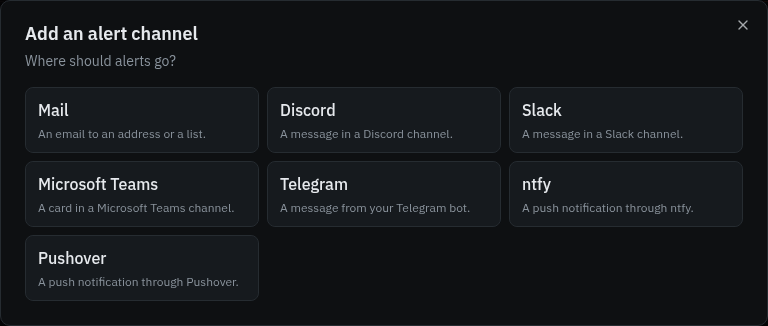
Add new channel opens a wizard: pick where alerts go, then fill in the details. Each type explains where to find its URL or keys and previews a message.
Discord, Slack, Teams and Telegram messages carry the headline, the issue number and title, the message, the location, release and occurrence count, and a link to the issue.
Send test delivers a test message. Each channel shows Not used yet, Delivered or Failed, with when.
A delivery that hits a dropped connection, a rate limit or a server error is retried a few times. One the other side rejects, such as to a removed webhook, fails at once.
Only team owners and admins add, change and delete the team's channels and rules.
Webhook, Teams and ntfy URLs may not point at private or reserved addresses, such as this server or the network behind it. Redirects are not followed. Set ALERTS_WEBHOOKS_ALLOW_PRIVATE=true to allow private addresses. Health checks have their own setting, LUMBERJACK_HEALTH_ALLOW_PRIVATE.
Rules
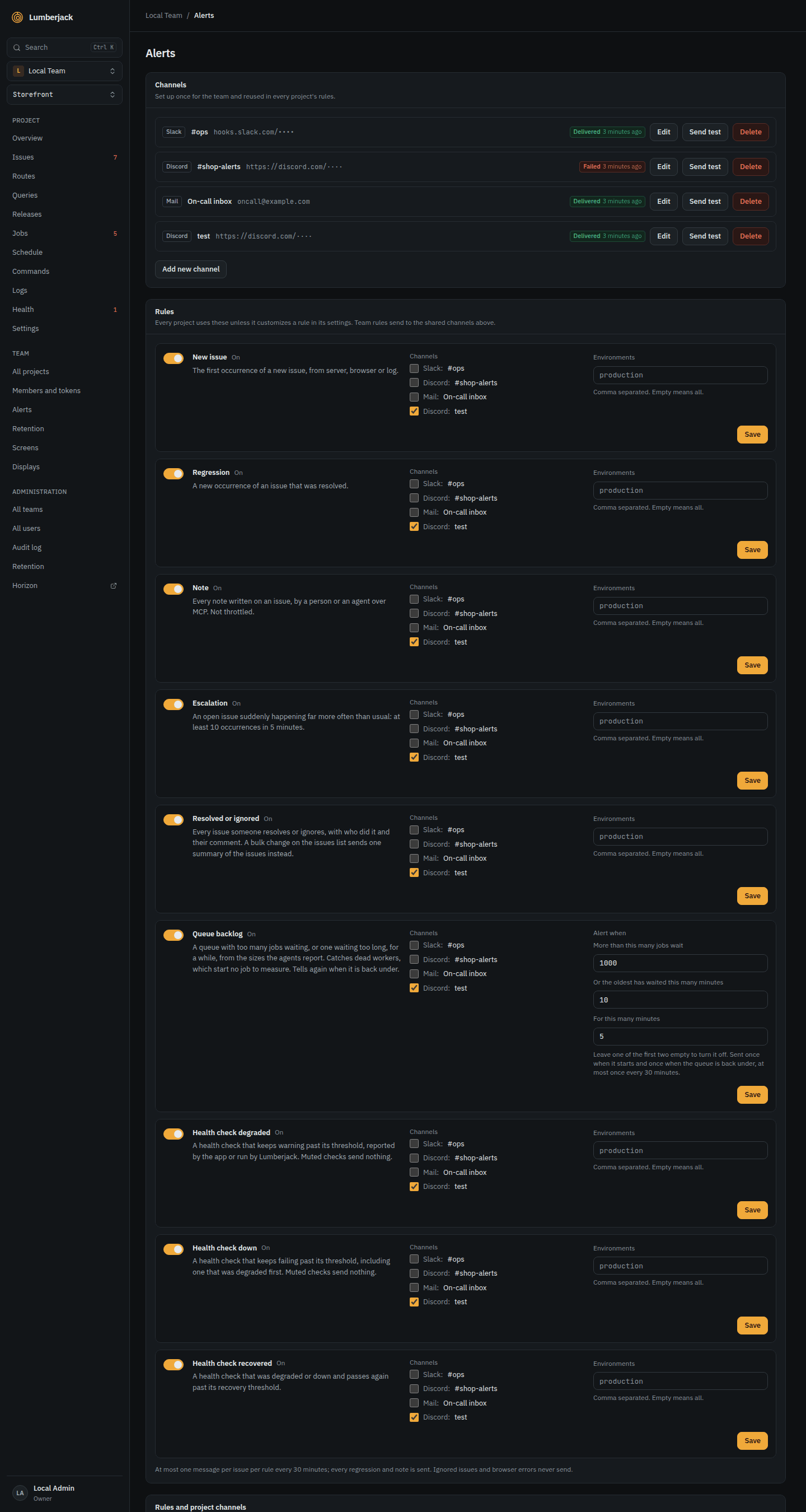
A rule is on or off, sends to the channels you pick, and can be limited to some environments (comma separated, empty for all). There is one rule per type:
| Rule | Sends | Default |
|---|---|---|
| New issue | The first occurrence of a new issue. | On |
| Regression | A new occurrence of a resolved issue, or an ignored issue coming back. | On |
| Escalation | An issue that suddenly happens far more often than usual. | On |
| Note | Every note written on an issue, by a person or an agent. | Off |
| Resolved or ignored | Every issue someone resolves or ignores. | Off |
| Queue backlog | A queue with too many jobs waiting, or one waiting too long. | On |
| Health check degraded | A health check that keeps warning or starts failing. | On |
| Health check down | A health check that keeps failing. | On |
| Health check recovered | A health check that is ok again. | On |
New issue and Escalation are throttled, see Limits. Every regression, note and status change is sent. Ignored issues and browser errors never send an alert.
A rule that is on also decides when members hear of new issues, health checks and queue backlogs in their own notifications, even with no channel picked. Turning the rule off stops those too.
A message carries the first line of the issue's latest note. A regression names who resolved the issue and when. While the Resolved or ignored rule is on, a comment given when resolving or ignoring goes with its message instead of a separate note.
Team rules and project overrides
The team's rules, on its Alerts page under Rules, apply to every project and send to the team's shared channels only.
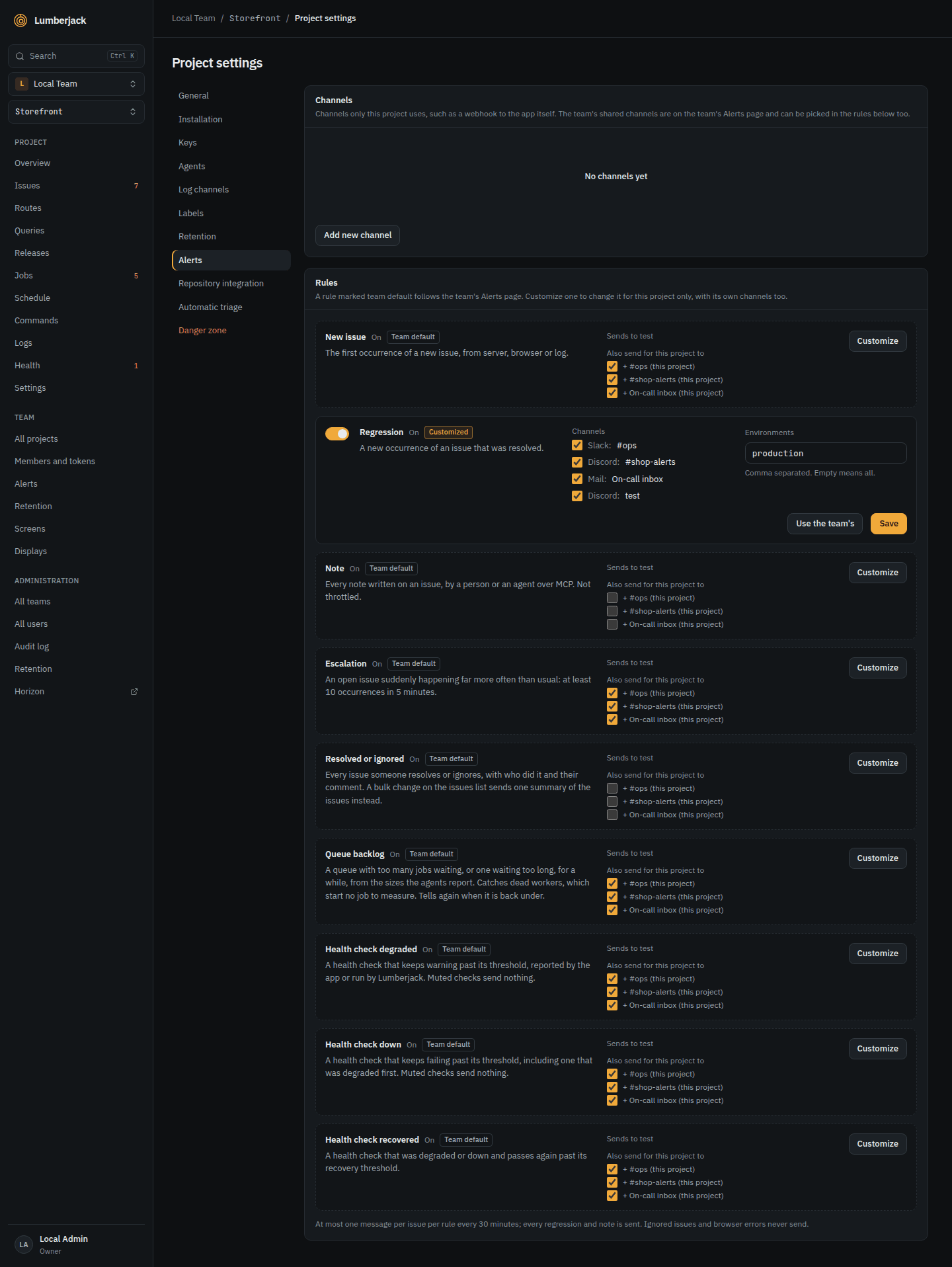
In a project's settings, under Alerts, each type shows either:
- Team default: what the team's rule does, read only: on or off, its channels and its environments. + channel (this project) adds a project channel or a shared channel the team's rule does not use, without customizing the rule. These add-ons follow the team's rule: while it is off they get nothing. Customize gives the project its own rule for that type, starting as a copy of the team's with the add-ons among its channels.
- Customized: the project's own rule, edited in place. Changes to the team's rule no longer reach it. Use the team's deletes it after asking, and the project follows the team's rule again. Its channels that the team's rule does not send to, such as the project's webhook, stay on as add-ons.
A new shared channel is added to the team's rules that are on by default. A new project channel is added to the project's rules of those types: as an add-on where the project uses the team's rule, directly where it has customized one.
Resolved or ignored
The message includes the comment given and who did it: a user, or an MCP token as name (MCP). Re-opening and taking an issue in progress send nothing.
Resolving or ignoring several issues at once from the issues list sends one summary: who did it, how many, up to 10 of the issues by number and title with +5 more for the rest, and a link to the issues list filtered to the new status. A rule limited to some environments summarizes only the issues whose latest occurrence is in one of them.
Queue backlog
Agents report the size of the app's queues every minute, see the Jobs page. The rule fires when, for 5 minutes, a queue has more than 1,000 jobs waiting or its oldest job has waited more than 10 minutes. Change any of the three on the rule, or leave a threshold empty to turn it off. It sends once when the backlog starts and once when the queue is back under, and covers every queue the agents report, whatever its environment.
A queue can have its own thresholds. Alert next to it in the Jobs page's Queues card sets the jobs waiting, the oldest wait and how long, for that queue only, or mutes the queue. A field left empty keeps the rule's value. They apply whether the project uses the team's rule or its own, and the project's Alerts settings list them under the rules. The alert names the thresholds it used, with "(this queue)" when they are the queue's own. Setting them needs the right to change the project.
Webhooks
A webhook channel POSTs JSON to your endpoint.
{
    "version": "1",
    "sent_at": "2026-11-03T10:12:00+00:00",
    "event": "new_issue",
    "project": { "id": "...", "slug": "shop", "name": "Shop" },
    "environment": "production",
    "issue": {
        "id": "...",
        "reference": "SHOP-42",
        "title": "Illuminate\\Database\\QueryException",
        "message": "SQLSTATE[40001]: Deadlock found when trying to get lock",
        "status": "open",
        "source": "server",
        "escalating": false,
        "occurrences": 1,
        "first_seen_at": "...",
        "last_seen_at": "...",
        "url": "https://lumberjack.example.com/projects/.../issues/..."
    },
    "burst": null,
    "status_change": null,
    "note": null
}
event is the rule, or test:
new_issue, regression, escalation, status_change, note, bulk_status_change, queue_backlog, health_degraded, health_down, health_recovered.
status_change and note are filled in for those events.
A bulk status change lists every issue it changed, with the new status, resolved or ignored, and who did it.
{
    "version": "1",
    "sent_at": "2026-11-03T10:12:00+00:00",
    "event": "bulk_status_change",
    "project": { "id": "...", "slug": "shop", "name": "Shop" },
    "status": "resolved",
    "actor": "Morten",
    "issues": [
        {
            "id": "...",
            "reference": "SHOP-42",
            "title": "Illuminate\\Database\\QueryException"
        },
        { "id": "...", "reference": "SHOP-43", "title": "TypeError" }
    ],
    "url": "https://lumberjack.example.com/projects/.../issues?status=resolved"
}
A queue backlog has no issue. Its body carries the queue and the thresholds instead, with state either started or recovered:
{
    "version": "1",
    "sent_at": "2026-11-03T10:12:00+00:00",
    "event": "queue_backlog",
    "project": { "id": "...", "slug": "shop", "name": "Shop" },
    "queue": {
        "connection": "redis",
        "name": "default",
        "state": "started",
        "size": 1240,
        "oldest_age_s": 840,
        "since": "2026-11-03T10:05:00+00:00",
        "url": "https://lumberjack.example.com/projects/.../jobs"
    },
    "thresholds": { "size": 1000, "age_minutes": 10, "sustain_minutes": 5 }
}
A health check has no issue either. check.state is down, degraded or recovered, and hosts lists the servers it fails on. It is empty for checks Lumberjack runs itself:
{
    "version": "1",
    "sent_at": "2026-11-03T10:12:00+00:00",
    "event": "health_down",
    "project": { "id": "...", "slug": "shop", "name": "Shop" },
    "environment": "production",
    "check": {
        "id": "...",
        "name": "disk:s3",
        "slug": "disk:s3",
        "source": "reported",
        "type": null,
        "state": "down",
        "message": "The disk is not writable.",
        "hosts": ["web-1"],
        "since": "2026-11-03T10:10:00+00:00",
        "url": "https://lumberjack.example.com/projects/.../health?check=..."
    }
}
Every request is signed with the channel's secret, shown once when the channel is created:
X-Lumberjack-Event: the event.X-Lumberjack-Timestamp: when it was sent.X-Lumberjack-Signature:sha256=and the HMAC-SHA256 of{timestamp}.{body}with the secret.
An SDK may verify these for you; see its docs.
Limits
| What | Limit |
|---|---|
| Send test | 6 a minute per person |
| New issue and Escalation messages | 1 per issue, rule and channel every 30 minutes |
| Queue backlog messages | 1 new backlog per queue every 30 minutes |
| Issues named in a bulk summary message | 10 |
| Discord sender name | 80 characters |