
Projects
A project is one app you monitor. Every member of its team can see it; team owners and admins change its settings.
The projects list
Projects in the sidebar shows a card for each project of the team:
- open issues, and the errors, p95 and failed jobs of the last 24 hours;
- a chart of errors per hour;
- Calm when the project has no open issues and every agent checks in;
- Agent offline (or 2 agents offline) and Not seen: … when an agent stopped checking in, with the hosts it ran on.
Search projects filters the cards.
Live updates
Pages update in place when another member, an MCP tool or new data changes what they show, including open kiosks and TVs (see Status screens).
A settings page you are editing does not change under you. It says This page changed elsewhere instead: Reload loads the new state and drops your unsaved edits, saving keeps your edits and loads the rest.
Creating a project
Team owners and admins create projects with New project, giving a Name and an Issue prefix. The prefix, suggested from the name, starts every issue number. It has 2 to 8 capital letters and digits, starts with a letter and is unique in the team.
The new project opens on its Installation settings: how to install the SDK, the .env values, the agent setup, the browser script and a test command. The server token is shown only once, right after you create the project. Copy it then, or rotate it later.
Switching project
Picking another project in the sidebar or the command palette opens the same page in it: from a job to its jobs. A page about one thing, like a trace, opens the other project's overview.
Settings
Only team owners and admins change settings. The settings are split into sections, one open at a time; the address names the open section (such as #agents).
- General: the name, the slug, the issue prefix, allowed origins and extra secret fields. The slug is used in URLs and as the project argument in MCP. It takes letters, digits,
-and_, and is unique in the team. - Installation: what to install and set.
- Keys: the server token for the agent, the public key for browser errors, and public stats. Public stats is a secret URL that serves the project's figures on the metrics API without a token. It is off by default. All three can be rotated. The server token is shown only once.
- Allowed origins: browser errors are accepted only from these origins, such as
https://shop.example.comwithout a path. With none, all are rejected. - Extra secret fields: keys whose values are replaced with
[filtered]before they are stored, in headers, session, Context and log context, on top of the keys that are always masked:password,passwd,pwd,secret,token,authorization,cookie,api_key,apikey,access_key,private_key,jwt,dsn,credit_card,card_number,cvvandsession_id. Values that look like secrets are masked whatever their key, see Security.- A plain word masks every key that contains it:
cpr. *is a wildcard in the key name:card_*.- A dotted pattern matches the full path:
session.checkout.*.
- A plain word masks every key that contains it:
- Agents: the servers that send data, see Agents.
- Alerts: the project's own channels, and its rules: the team's by default, or customized for the project.
- Log channels: the channels the project's log lines go to, with the lines of the last 24 hours and each channel's own retention. Names are kebab-case. Lines sent to a channel the project does not have go to
default, which cannot be deleted. Deleting another channel moves its lines todefault. A channel that received lines in the last 7 days but does not exist yet gets a Create button here and a banner on the Logs page. - Labels: rename, recolor or delete issue labels.
- Retention: see Retention.
- Repository integration: see Repository integration.
- Automatic triage: see MCP.
- Danger zone: see Deleting a project.
The project's data sources are listed in the settings menu too.
Agents
An agent is a small process from the SDK that runs once on every server of the app, under Supervisor. It sends the app's data to Lumberjack and checks in every minute.
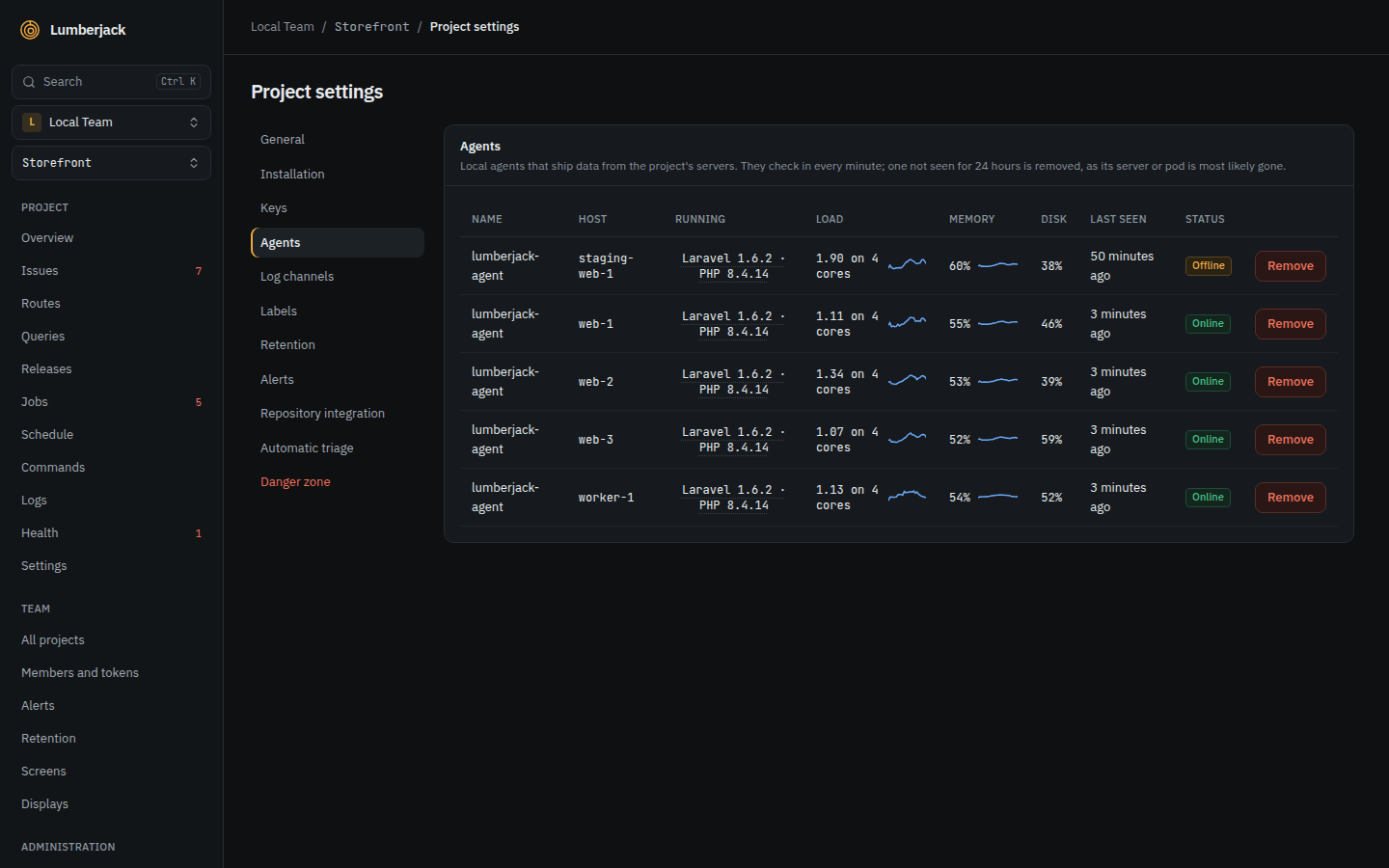
Agents in the settings lists every agent that has checked in:
| Column | Shows |
|---|---|
| Host | The server or pod it runs on. |
| Name | The agent's name, when it has one. |
| Running | SDK and runtime, e.g. "Laravel 0.1.0 · PHP 8.5.1". Hover for the agent and framework version. |
| Last seen | Its last check-in. |
| Load | The 1 minute load against the number of cores, and the highest load per hour over 24 hours. |
| Memory | Memory in use, and the highest use per hour over 24 hours. Hover for the bytes. |
| Disk | Disk in use. Hover for the bytes. |
| Status | Online or Offline. |
Memory and disk turn amber above 90%, load above the number of cores. In a container, the container's own limits count.
Offline agents
- An agent that has not checked in for 5 minutes is Offline. The projects list warns about it.
- Team members get an Agents notification, once per project however many agents went offline, and again if one goes offline after coming back. It is on in the app by default, see notification settings.
- An agent that has not checked in for 24 hours is removed.
- Remove removes an agent right away. It comes back if it checks in again.
What agents report
With each check-in, an agent reports the size of the queues the SDK watches, shown on the Jobs page and used by queue backlog alerts, and its host's load, memory and disk. Both follow retention.
Browser script
The project settings show the script tag for browser errors:
<script
    src="https://lumberjack.example/sdk/v1.js"
    data-key="lj_pub_..."
    data-environment="production"
    defer
></script>| Attribute | Does |
|---|---|
data-key | The project's public key. Without it nothing is sent. |
data-environment | The environment of the page. |
data-release | The release, e.g. a commit hash. |
data-user | The user's id, for users affected. |
data-trace | The trace id of the request that rendered the page. |
data-announce | true logs a line in the console when the script is active. |
data-vitals | false stops measuring Web Vitals. |
data-endpoint | Where to send, instead of /api/ingest/browser on the script's server. |
Crawlers and automated browsers are ignored. With each page view's Web Vitals, the script sends the class of device: mobile, tablet or desktop.
The script has a small API on window.Lumberjack:
| Call | Does |
|---|---|
Lumberjack.init({ ... }) | Sets any of the options above, and ignore: strings or regular expressions matched against the message. |
Lumberjack.setUser(id) | Sets the user, null to clear it. |
Lumberjack.captureException(error, context) | Sends an error you caught yourself, with extra context. |
Lumberjack.flush() | Sends what is waiting now. |
Lumberjack.version | The script's version. |
The script ignores common noise: "Script error.", "ResizeObserver loop", "Non-Error promise rejection captured", "Uncaught (in promise)", and errors that come only from browser extensions.
Retention
Retention sets how long each kind of data is kept, on three levels. Each level is the default for the level below it, and the most that level may keep:
- Application, the whole Lumberjack: Administration > Retention, for system administrators. Empty uses the built-in default and sets no maximum.
- Team: Team > Retention in the sidebar, for team owners and admins. At most the application value.
- Project: Retention in the project's settings, for team owners and admins. At most the team value. Job classes and log channels can have their own value, also at most the team value.
Each value is a number of days from 1 to 3650, empty to inherit, or Forever. A team or project can choose Forever only when the application keeps that data forever, and the team sets no number for its projects. The built-in defaults are never forever.
A value above the limit is rejected, with the limit named. When you lower a level, the levels below it are capped at once and show as Capped; their own values come back when the limit is raised. A level with no value sets no limit, so a project can keep data longer than the built-in default when neither its team nor the application sets one.
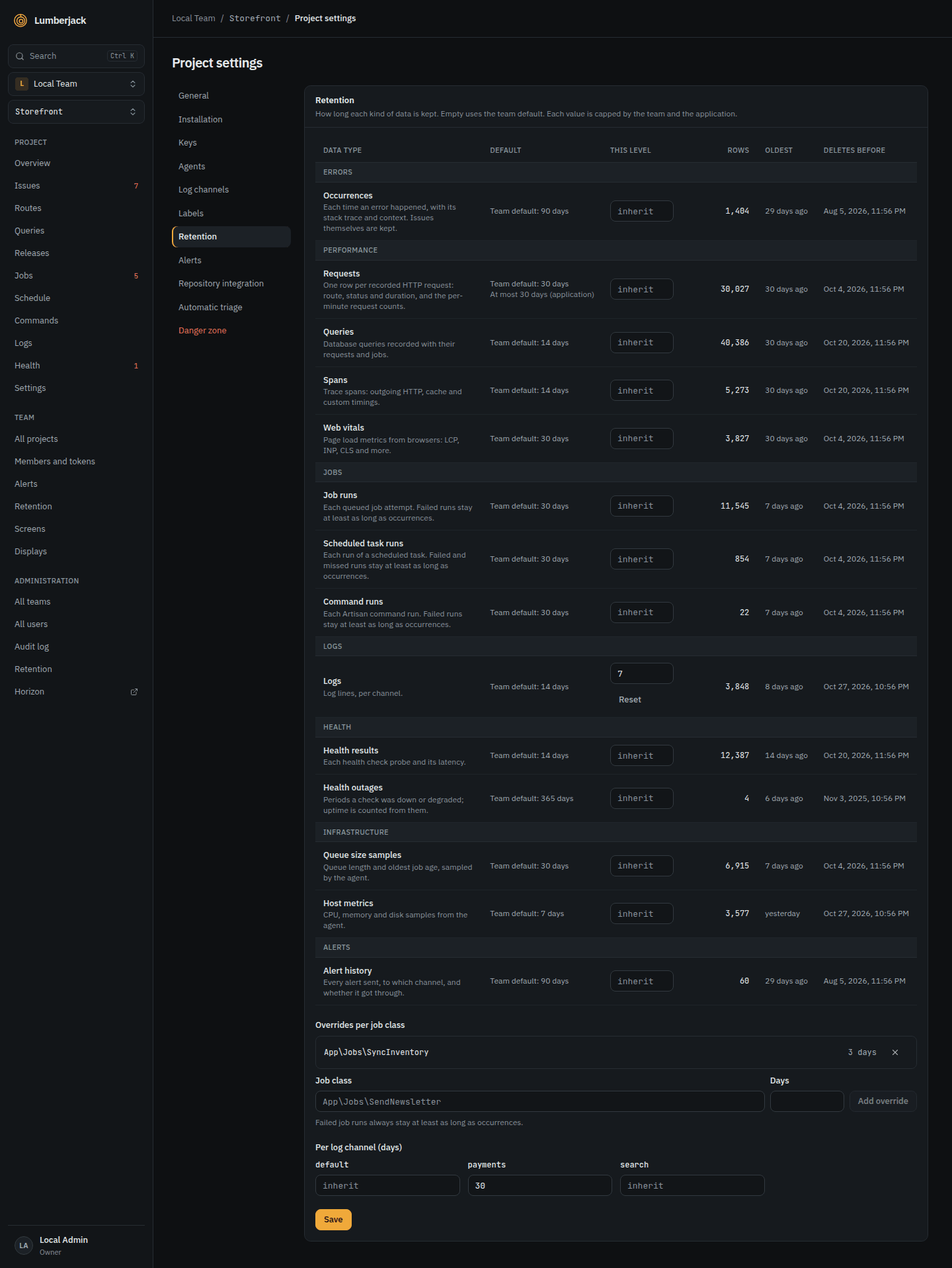
For each data type, the table shows the Default the level inherits, the value of This level, the limit from above, the Rows stored, the age of the Oldest row, and Deletes before: the date up to which data is deleted next. Data is deleted once a day.
| Data type | Default | What it is |
|---|---|---|
| Occurrences | 90 days | Each time an error happened, with its stack trace and context |
| Requests | 14 days | Recorded HTTP requests and the request counts per minute |
| Queries | 14 days | Database queries recorded with requests and jobs |
| Spans | 14 days | Outgoing HTTP calls, cache operations and custom timings in traces |
| Web vitals | 30 days | Page load metrics from browsers |
| Job runs | 30 days | Each attempt of a queued job. Can be set per job class |
| Scheduled task runs | 30 days | Each run of a scheduled task |
| Command runs | 30 days | Each console command run |
| Logs | 14 days | Log lines. Can be set per channel |
| Health results | 14 days | Each health check result and its latency |
| Health outages | 365 days | Periods a check was down or degraded. Uptime is counted from them |
| Data source history | 30 days | What each data source answered, for charts |
| Queue size samples | 30 days | Queue length and oldest job age, reported by the agents |
| Host metrics | 7 days | CPU, memory and disk, reported by the agents |
| Alert history | 90 days | Every alert sent, to which channel, and whether it got through |
| Audit log | 365 days | What administrators did. Application level only |
| Notification history | 90 days | Everyone's notification center. Application level only |
Issues themselves are never deleted, only their occurrences. Failed job runs, failed or missed scheduled runs and failed command runs are kept at least as long as occurrences. An outage is kept until it ends.
Repository integration
Link a GitHub repository to create GitHub issues from Lumberjack issues, with a button or through MCP.
- Enter the Repository as
owner/name. - Create a fine-grained token with only Issues: read and write on that repository. Create token on GitHub opens GitHub with these settings filled in. Paste it under Fine-grained token.
- Test connection checks the token and says whether the repository is private or public.
- For a public repository, tick Allow creating issues in a public repository.
- Optionally list Labels, comma separated, for the created issues.
Lumberjack warns 14 days before the token expires.
Deleting a project
The Danger zone deletes the project and all its data, after you type the project's name. Deleting the data can take several minutes.
Limits
| What | Limit |
|---|---|
| Allowed origins | 50 |
| Extra secret fields | 50, 64 characters |
| Log channel name | 64 characters |
| Browser errors per page view | 100 |
| Same browser error per page view | 5 |
| Retention value | 1 to 3650 days |