
Setup and system administration
System administrators set up Lumberjack, manage teams and users, and look after the server.
First-run setup
A Lumberjack without users sends every page to /setup, where you choose the name, email and password of the first system administrator. There is no default account. The administrator starts without a team and lands on Administration > All teams, where teams are created.
Protect setup with a token
Until setup is done, whoever opens Lumberjack first becomes its administrator. On a server reachable from outside, set a setup token:
LUMBERJACK_SETUP_TOKEN=a-long-random-stringSetup then asks for the token too. Generate one with openssl rand -hex 24.
The setup flag
When the first user exists, Lumberjack writes the file storage/app/setup/complete, and writes it again if it goes missing. To make Lumberjack check its setup again, delete the file, through the storage mount or with:
php artisan setup:clearphp artisan migrate:fresh deletes the flag too.
What /setup shows
| State | /setup |
|---|---|
| No users | Setup form, which asks for the token when one is set |
| Users, but no active administrator | Recovery: open only with LUMBERJACK_SETUP_TOKEN, otherwise 404 |
| An active administrator exists | 404 |
An administrator is active when they are not suspended. /setup is rate limited.
Lost the last administrator?
From a shell on the server, or with docker compose exec lumberjack ...:
php artisan lumberjack:make-admin someone@example.comOr set LUMBERJACK_SETUP_TOKEN and create a new administrator through /setup.
The last active administrator cannot remove their own administration, suspend themselves or delete their own account.
Command line
| Command | What it does |
|---|---|
php artisan lumberjack:create-user | Creates a user. Takes --name, --email and --password, and asks for any you leave out. --admin makes them an administrator. The first user is always one. --team="Name" makes them the owner of a new team. |
php artisan lumberjack:make-admin {email} | Makes an existing user an administrator. |
php artisan lumberjack:make-admin {email} --revoke | Removes administration, unless they are the last active administrator. |
php artisan setup:clear | Deletes the setup flag. |
php artisan lumberjack:prune | Deletes data older than its retention. Also runs every day by itself. |
php artisan webpush:vapid --show | Prints a new key pair for browser notifications, to set as VAPID_PUBLIC_KEY and VAPID_PRIVATE_KEY. Keys are generated automatically; set them to keep them across a database restore. |
New VAPID keys make every browser turn notifications on again.
Scheduled commands
The scheduler runs these by itself.
| Command | Runs | What it does |
|---|---|---|
lumberjack:mark-stuck-jobs | Every minute | Marks job runs that outlived their timeout as stuck. |
lumberjack:mark-missed-tasks | Every minute | Marks scheduled tasks whose run is overdue as missed. |
lumberjack:return-ignored-issues | Every minute | Re-opens issues whose ignore period is over. |
lumberjack:send-watch-digests | Every minute | Mails watchers the grouped updates on their issues. |
lumberjack:check-queue-backlogs | Every minute | Alerts on queues over their backlog threshold, and when they recover. |
lumberjack:run-health-checks | Every minute | Runs the health checks that are due. |
lumberjack:fetch-data-sources | Every minute | Fetches the external JSON sources that are due. |
lumberjack:notify-offline-agents | Every minute | Tells members who want it when an agent goes offline. |
horizon:snapshot | Every 5 minutes | Records queue metrics for the Horizon dashboard. |
model:prune | Every hour | Deletes agents and health check hosts not seen for 24 hours. |
lumberjack:archive-silent-health-checks | Every day | Archives reported health checks that sent nothing for a week. |
lumberjack:prune | Every day | Deletes data older than its retention. |
Mail
Every mail has an HTML and a plain-text version, and follows the reader's light or dark mode where the mail client supports it.
| Sent to | From | |
|---|---|---|
| New error, regression, escalation | the rule's mail channels, and watchers | alerts |
| Note, resolved or ignored, bulk resolve | the rule's mail channels | alerts |
| Health check down, degraded, recovered | the rule's mail channels | alerts |
| Queue backlog, queue recovered | the rule's mail channels | alerts |
| Test message | the channel being tested | alerts |
| Mention | the member a note tags | notifications |
| Assigned, taken off | the member concerned, once per action | notifications |
| Updates on a watched issue | its watchers | notifications |
| New issues, health checks and the rest | members who turned on that mail | notifications |
| Invitation | the invited address | notifications |
| Password reset, email confirmation | the account | notifications |
Subjects start with the project in brackets, such as [Demo] New error: DEMO-12 RuntimeException. The footer of each mail says why it was sent and where to change that. An address gets one mail per thing that happened, however many rules lead to it.
| Variable | Default | What it does |
|---|---|---|
MAIL_ALERTS_FROM_ADDRESS | MAIL_FROM_ADDRESS | Sender of what alert rules send. |
MAIL_NOTIFICATIONS_FROM_ADDRESS | MAIL_FROM_ADDRESS | Sender of personal mail: everything else above. |
MAIL_ALERTS_FROM_NAME | Lumberjack | Sender name of alert mail. |
MAIL_NOTIFICATIONS_FROM_NAME | Lumberjack | Sender name of personal mail. |
Previewing mails
In local development (APP_ENV=local), sign in and open /dev/mail. It lists every mail with sample data, in light and dark mode and as plain text, without sending anything.
Administration pages
Administrators see an Administration section in the sidebar. Everything they do there goes into the audit log. Administrators can see every team and project, whether or not they are members.
- All teams: every team with its owner, members, projects and errors of the last 24 hours. Open a team to work in it, delete it with all its data, or create one. The owner can be an existing user, or the email of someone without an account, who is then invited to own the team.
- All users: 50 a page, with Search by name or email and badges for Administrator, Suspended and Must change password. Invite someone to a team as admin or member, send a password reset link, require a new password, make or revoke administrators, and suspend or reinstate users. Administrators cannot do any of this to their own account.
- Audit log: who did what and when, 50 a page. It records teams created, deleted or opened, users invited, suspended or reinstated, administration granted or revoked, password resets sent and new passwords required.
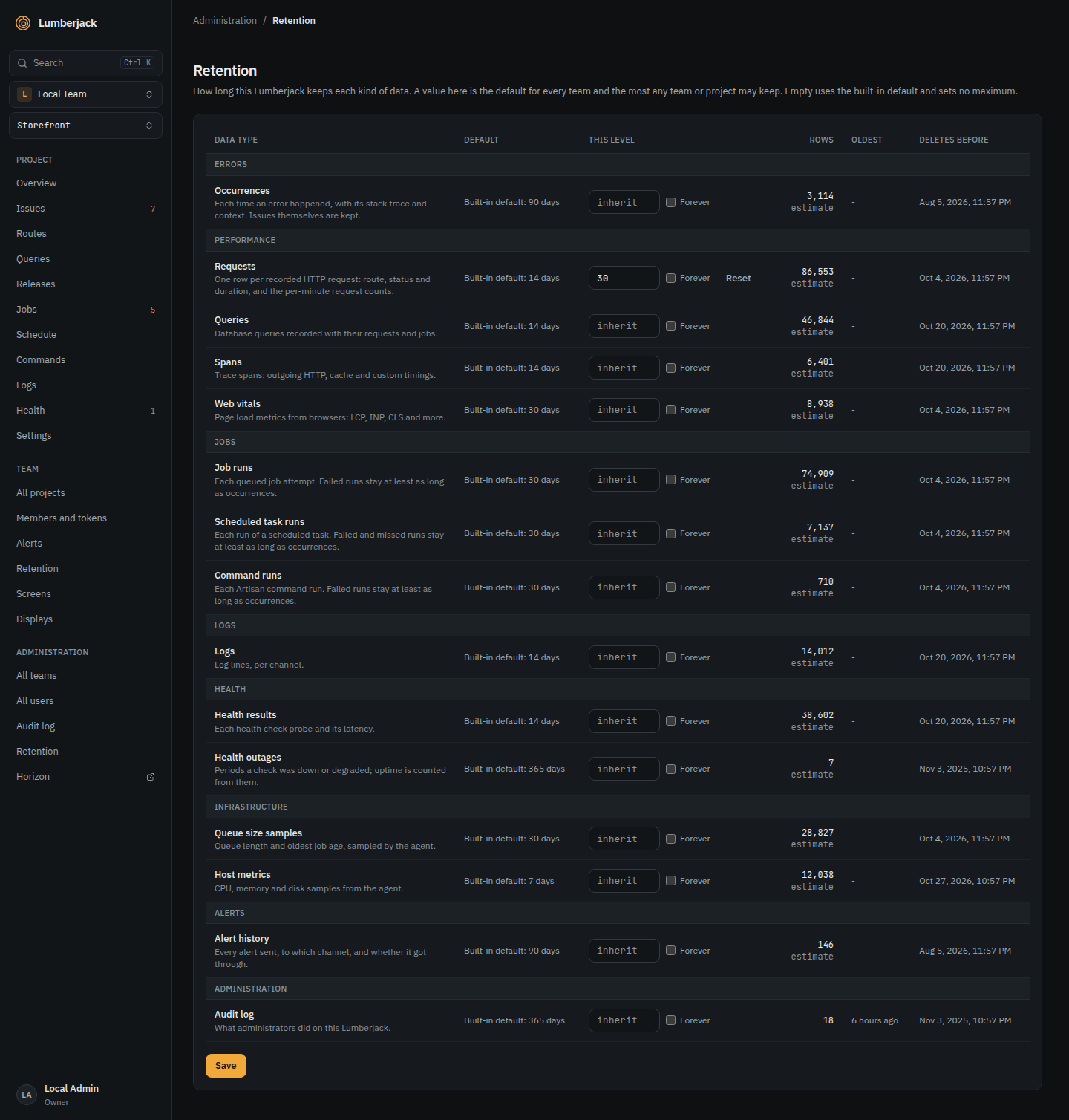
- Retention: how long this Lumberjack keeps each kind of data, as the default and the maximum for every team. See Retention.
- Horizon: the queue dashboard at
/horizon, also in the command palette. Only system administrators can open it.
Accounts come by invitation
There is no public registration. Accounts come from first-run setup, an invitation or the command line. An account in no team sees a page saying so until an invitation arrives. See Teams and accounts.
Who may create teams
By default anyone signed in can create a team on the team page and becomes its owner. Set LUMBERJACK_TEAM_CREATION=admins to let only system administrators create teams.
Suspending a user
A suspended user is signed out, cannot sign in, and their MCP tokens stop working. The sign-in page answers as for a wrong password.
Requiring a new password
A user who must change their password can only open the security settings until they choose a new one.
About
Click the version at the bottom of the sidebar to open About. It shows the version, the commit it was built from, and links to the release notes and the documentation. System administrators also see PHP, Laravel, the database, and the queue, cache and session drivers.
The Docker image shows its release version. A git checkout shows its tag, or "dev" without git.
Security
Response headers
Every response sends:
X-Frame-Options: SAMEORIGINandContent-Security-Policy: frame-ancestors 'self'X-Content-Type-Options: nosniffReferrer-Policy: strict-origin-when-cross-origin- a
Permissions-Policythat turns off camera, microphone, location, payment and USB Strict-Transport-Security: max-age=31536000, whenAPP_URLstarts withhttps://
Browser ingest and the SDK script still work from other origins.
Proxies and links
Set APP_URL to the address people open Lumberjack on. Links in mails, alerts and notifications always use it. TRUSTED_PROXIES lists the proxies whose X-Forwarded-* headers are trusted. See Docker.
Secrets in stored data
Lumberjack filters secrets out of exception, log, job and command context, and out of request URLs, before it stores them. Passwords, tokens, API keys, credentials in URLs and similar values become [filtered]. To filter more fields by name, see Extra secret fields. To filter more values, add regular expressions in config/lumberjack.php under scrubbing.value_patterns, as pattern => replacement.
A single context is stored up to 64 KB. Entries past that are replaced by [truncated] N KB.
Ingest and MCP limits
- Browser ingest takes 30 batches a minute per address and key, and 300 a minute per address. A compressed body is rejected with
415. - An address that sends 30 unknown server tokens to
/api/ingest, or unusable MCP tokens to/mcp, within a minute gets429until the minute is over.